On this page
- What does governing AI mean in a work platform?
- What binds your business today, and what does not?
- The Act is in force, and it applies
- What is live for an ordinary business right now
- What does not bind you yet
- The most useful sentence here is not in a regulation
- What can an administrator switch off?
- An honest note on plans, which we are not going to smooth over
- The controls themselves
- What does an agent see, and what does MCP see?
- The controls that exist for MCP
- What happens to your data, and who decided how long it is kept?
- What monday says about monday AI
- What Anthropic says about commercial Claude
- One cost fact that is really a governance fact
- How would you prove any of it six months later?
- What is a governance programme made of?
- What can you honestly say about certification, yours and everyone else's?
- When do you not need us for this?
- Frequently asked questions
If your team has already started using AI inside the platform where the work lives, you are further ahead than most. Somebody wrote the first AI column. Somebody connected Claude or ChatGPT to a board and got an answer that used to take an afternoon. That’s a good place to be standing.
The question that arrives next is quieter, and it usually comes from finance, from legal, or from whoever signs the security questionnaire. Who is allowed to do that? On which data? Does anyone check the output before it moves money or changes a client record? And if a regulator, an auditor or a large customer asks in six months what your AI did last March, what could you actually show them?
This guide answers those four questions for a work platform, using monday.com as the worked example. That is where most of these controls are documented in public and can be checked line by line. Every date, limit and quoted string below comes from a primary source, and each one is linked so you can open it yourself. If a limit exists it is named as a limit. The rules do not require what people think they require, that is said plainly too. This page is the umbrella, and it points onward rather than repeating them.
What does governing AI mean in a work platform?
Security is about keeping the wrong people out. Governance is about what the right people, and the software acting for them, may do once they are in.
monday draws the line in its secure configuration checklist: "monday.com offers a comprehensive set of enterprise-grade security capabilities. Under the shared responsibility model, customers are responsible for configuring security controls in their account, including managing access and governing the data their organization uploads."
The whole job is in six words: "governing the data their organization uploads". The vendor supplies the switches. Deciding where they sit is yours.
Four questions carry almost all the weight:
- 1.Who may use what - meaning which roles, which agents, and who may connect an outside AI tool.
- 2.On which data - meaning which workspaces, boards, and columns AI may touch.
- 3.With what oversight - meaning which actions run unattended and which pause for a named person.
- 4.How you would prove it - meaning what is logged, for how long, on which plan, and whether you can export it.
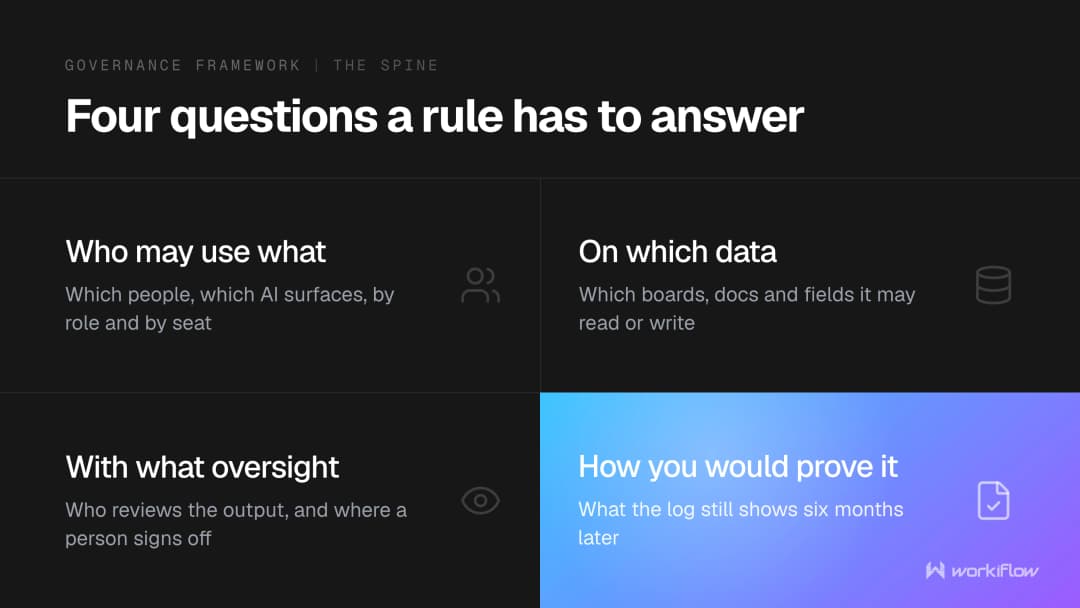
Governance conversations go badly when the first three were answered and the fourth was never asked.
What binds your business today, and what does not?
Some articles say the EU AI Act is not in force. Others say it already requires a human to approve every automated decision. Neither is right, and the difference matters when you are writing policy.
The Act is in force, and it applies
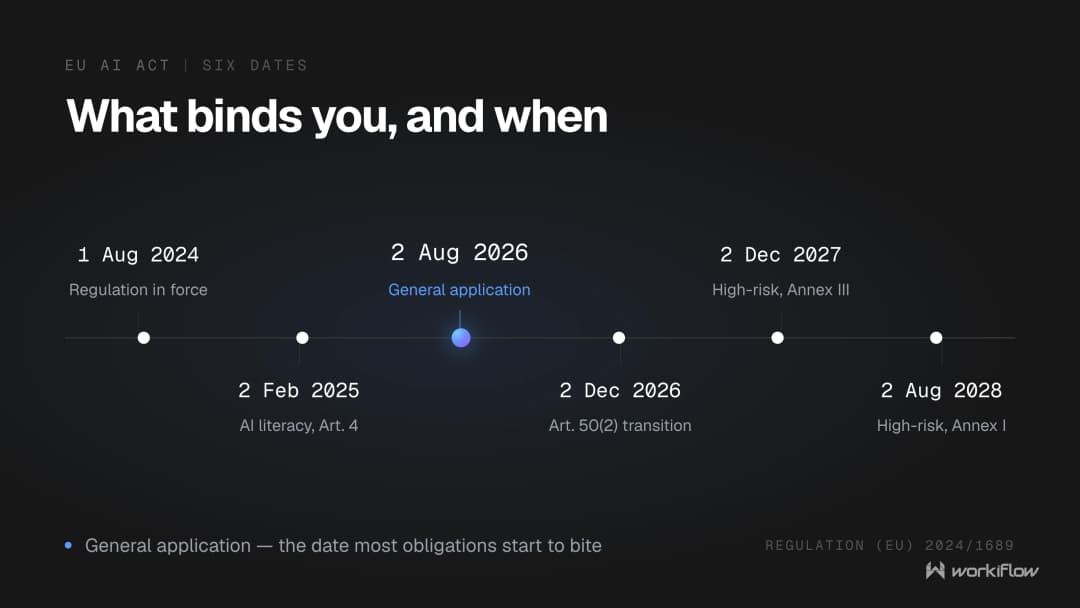
Regulation (EU) 2024/1689, the EU AI Act, entered into force on 1 August 2024. The Digital Omnibus on AI, Regulation (EU) 2026/1744, states it in its opening recital: "Regulation (EU) 2024/1689 entered into force on 1 August 2024."
Its general application date is separate and sits in Article 113 second paragraph of the Act itself: "It shall apply from 2 August 2026." That paragraph was not amended by the Digital Omnibus, which touched only the third paragraph of Article 113. So the AI Act applies generally today. It is not a future law.
For one page to check all of this against, use the European Commission's own implementation timeline on the AI Act Service Desk. It prints every milestone in order, from entry into force on 01 Aug 2024 through to 02 Aug 2028, against which it prints "Rules for high-risk AI embedded in regulated products covered by Annex I apply", and it states that it takes the Digital Omnibus amendments into account.
One caution about the same website: its individual article pages have not caught up. Article 4 carries a notice headed "Digital Omnibus Disclaimer" reading "This provision has been amended by the Digital Omnibus on AI. The text displayed on this page has not yet been updated to reflect those amendments." Every article page explains why at its foot: "View the official text. The text used in this tool is the 'Artificial Intelligence Act (Regulation (EU) 2024/1689), Official version of 13 June 2024'." One Commission surface is current and says so; another is deliberately frozen at an older version.
What is live for an ordinary business right now
AI literacy has bound you since 2 February 2025. Article 4 sits in Chapter I, and it is addressed to "Providers and deployers of AI systems". A company that simply uses an AI system is a deployer, so you do not have to build anything to be in scope.
The Digital Omnibus replaced Article 4 in full and softened it. Both halves matter. As substituted, Article 4(1) reads: "Providers and deployers of AI systems shall take measures to support the development of AI literacy of their staff and other persons dealing with the operation and use of AI systems on their behalf, taking into account their technical knowledge, experience, education and training and the context the AI systems are to be used in, and considering the persons or groups of persons on whom the AI systems are to be used. This obligation does not require providers or deployers to guarantee any specific level of AI literacy of any individual."
The earlier wording asked providers and deployers to "ensure, to their best extent, a sufficient level of AI literacy", and that phrase was removed.
Recital (8) of the amending regulation gives the reason: "However, experience shared by stakeholders reveals that a solution imposing stringent obligations to ensure a sufficient level of AI literacy would not be suitable for all types of providers and deployers in relation to the promotion of AI literacy. Moreover, data indicates that imposing such obligations creates an additional compliance burden, particularly for smaller enterprises ...". The Commission's plain-language summary is shorter: "AI literacy: Previous AI literacy requirement for companies is simplified, with the Commission and the Member States taking a stronger role in promoting AI literacy".
The substituted Article 4 has three paragraphs. Paragraph 2 puts a duty on the Commission and the Member States to support providers and deployers, "in particular SMEs", in fulfilling that obligation, and requires the Commission to publish practical examples of how to comply. Paragraph 3 asks the Board to adopt recommendations. Neither shifts the deployer's own obligation.
Transparency duties are live, with one deadline ahead. Article 50's transparency rules started to apply on 2 August 2026, and a new Article 111(4) adds a transition: "Providers of AI systems, including general-purpose AI systems, generating synthetic audio, image, video or text content, that have been placed on the market before 2 August 2026 shall take the necessary steps in order to comply with Article 50(2) by 2 December 2026." It binds providers rather than every deployer, and the Article 50(2) duty is to mark outputs "in a machine-readable format and detectable as artificially generated or manipulated".
GDPR Article 22 has bound you since 25 May 2018, and it is the provision most often described backwards. Article 22(1) gives a person "the right not to be subject to a decision based solely on automated processing, including profiling, which produces legal effects concerning him or her or similarly significantly affects him or her". In the cases in points (a) and (c) of Article 22(2), where the decision is necessary for entering into or performing a contract, or is based on explicit consent, Article 22(3) requires the controller to implement suitable measures, "at least the right to obtain human intervention on the part of the controller, to express his or her point of view and to contest the decision".
Obtaining intervention and contesting a decision are remedies exercised after that decision, so Article 22 is an appeal route rather than a pre-approval checkpoint. It does not by itself require somebody to click approve before your automation runs. Both scope limiters matter too: "based solely on automated processing", and effects that are legal or "similarly significantly" felt.
What does not bind you yet
The Act's human oversight is Article 14: "High-risk AI systems shall be designed and developed in such a way, including with appropriate human-machine interface tools, that they can be effectively overseen by natural persons during the period in which they are in use."
Two things follow. First, scope: Article 14 binds high-risk AI systems, and ordinary business automation in a work platform is not that. Second, timing, and this is traceable rather than asserted. Article 14 sits in Chapter III, Section 2. The amended Article 113 third paragraph point (c) provides that "Chapter III, Sections 1, 2, and 3, with the exception of Article 6(5), shall apply from:" two dates, set out at points (i) and (ii). Against (i) it prints "2 December 2027 as regards AI systems classified as high-risk pursuant to Article 6(2) and Annex III", and against (ii) "2 August 2028 as regards AI systems classified as high-risk pursuant to Article 6(1) and Annex I". Article 14 is inside that deferred block.
So the human oversight obligations do not apply yet, which is not the same as the Act not being in force. Article 14 was also not amended: Article 1 of Regulation (EU) 2026/1744 enumerates 43 points of amendment to the AI Act, and Article 14 appears in none of them.
If you want an outside framework to structure a policy against today, ISO/IEC 42001:2023 is the AI management system standard, described on its catalogue page as specifying "requirements for establishing, implementing, maintaining, and continually improving an Artificial Intelligence Management System (AIMS) within organizations". It runs to 51 pages, was published in December 2023, and the text sits behind a CHF 225 paywall with a free sample and an online preview available. We will not tell you what its clauses require, because we would be guessing.
The most useful sentence here is not in a regulation
It is in monday's own AI FAQs. On the limitations of monday AI, monday writes that it "must not be used to develop competing AI models or services, engage in unlawful or harmful activities, misrepresent AI generated content as human generated, or perform fully automated decision-making with significant impacts on individuals, without safeguards and transparency."
Set that beside GDPR Article 22, which covers decisions "based solely on automated processing" producing "legal effects" or "similarly significantly" affecting a person. monday is not restating the law, and we are not claiming it is. But your platform vendor's acceptable-use position and the regulation point the same way, phrase for phrase, and that is a stronger argument for a steering committee than the Official Journal alone, because it is a term you have already agreed to.
What can an administrator switch off?
monday gives admins a named surface: "The AI governance section gives admins one central place to manage and monitor AI across the account. From here, you can control access to AI features, review how AI credits are being used, set usage limits, and manage AI access across your account."
To find it, monday prints two steps: "Click on your profile picture in the top right-hand corner of the page and choose Administration", then "Click AI governance on the left pane menu, then click on AI permissions".
An honest note on plans, which we are not going to smooth over
monday's documentation currently says two different things about which plans get these controls, on two of its own pages, both live today.
On "AI Permissions and Governance": " Note: The Enable AI features toggle in the AI permissions tab is available to all plans. All other settings within the AI permissions tab are available on the Enterprise plan only." Under the AI permissions sub-heading on the same page it also prints: " Note: This tab is only available on the Enterprise plan."
On "Managing AI Connectors and MCP Access", the eligibility block at the top reads: "Available on all plans. MCP is available for admins and members on all tiers. On Enterprise, admins can also enable guests to use MCP (turned off by default). Viewers don't have MCP access." That article routes the connector controls through the same AI permissions tab.
We are not going to average those out or pick a winner. Both were read from monday's documentation on 24 August 2026, the sensible move is to open your own Administration section and look. If your plan does not show a control described below, that is your answer, and it is worth raising with monday or your partner rather than assuming.
The controls themselves
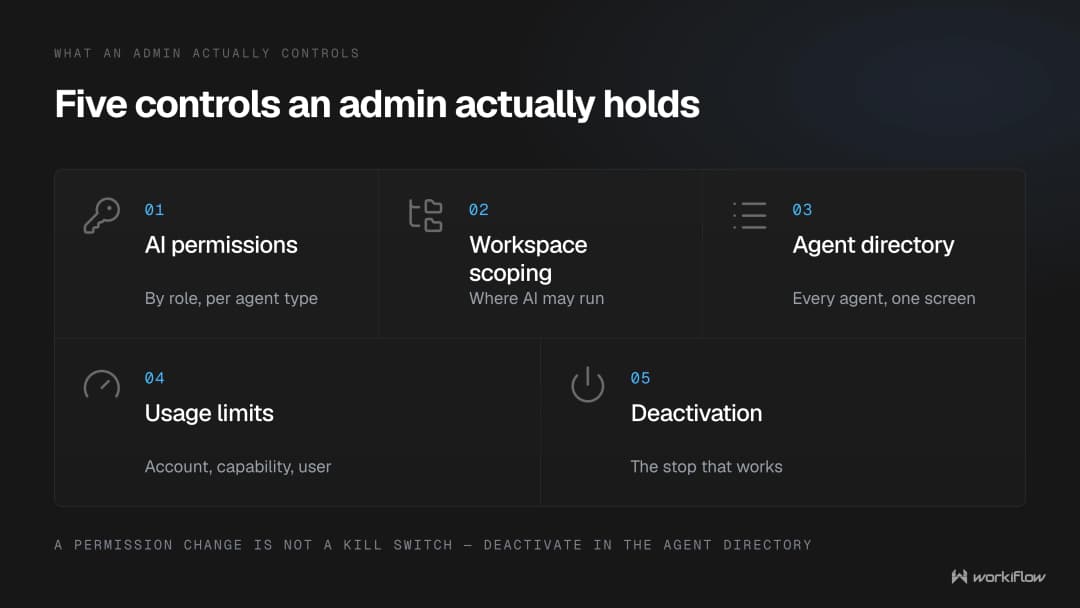
Agent types and features, by role. monday describes the shape: "The AI permissions tab lets you control AI access at the account level. Once AI is enabled, the page is organized into two main sections: AI agents and AI features." Five agent types are managed at the top: "user agents, monday agents, third party agents, org agents, and external AI connectors."
Workspace scoping, for some features. For AI Sidekick and AI Blocks, "after selecting the relevant roles, you can decide whether the feature is enabled in all workspaces, enabled in selected workspaces, or disabled in selected workspaces." The caveat is monday's own: "The same general setup applies across AI features, except that some features support role-based controls but not workspace selection."
That matters because workspace scoping is your data-classification mechanism. monday's checklist says so: "If you are concerned with categories of sensitive data that are processed and want to exclude the possibility of this data being processed by AI, you can turn off AI on the workspace level using workspace permissions." If one workspace holds HR files or patient data, that sentence is your control. On the blunter option of disabling AI account-wide, monday's own view is that it "is not recommended".
An inventory of every agent. The Agent directory "gives admins a centralized view of the AI agents running across the account. The directory displays key details for each agent, including the agent name, owner, sharing status, current status, asset access, creation date, and model used." Admins can activate or deactivate an agent from the row menu and filter the list by user. Seven attributes on one screen is a real inventory.
Spend limits. "The Usage limits tab helps you control how AI credits are used across your account at three levels: account-wide, per AI capability, and per user." Each feature limit is labelled Hard or Soft, and monday notes that some capabilities continue running for a short period after a limit is reached.
Two limits on stopping AI work. monday states: "Note: If you already have AI blocks or agents running, changing permissions won't stop or break them." A permission change is not a kill switch, and as above a hard credit limit is not an instant stop either. Deactivation is the control that works: admins can activate and deactivate agents from the row menu in the Agent directory, and for external agents monday says specifically that "Admins can deactivate any external agent at any time directly in the Agent directory, under the Administration section."
Two controls still rolling out. monday labels both agent permissions in the AI permissions tab and the Agent directory as being "in gradual release". Your account may not have them yet.
Usage data is not an audit trail. Admins can "review AI credits consumption per feature and per user" and "download AI usage data for all users". That is a spend report. Knowing how many credits somebody used is not knowing what their agent did to your data, and the two should never be presented to a board as the same thing.
What does an agent see, and what does MCP see?
This is the distinction the page turns on, and monday states it better than we could. From its Bring Your Own Agent comparison, on MCP:
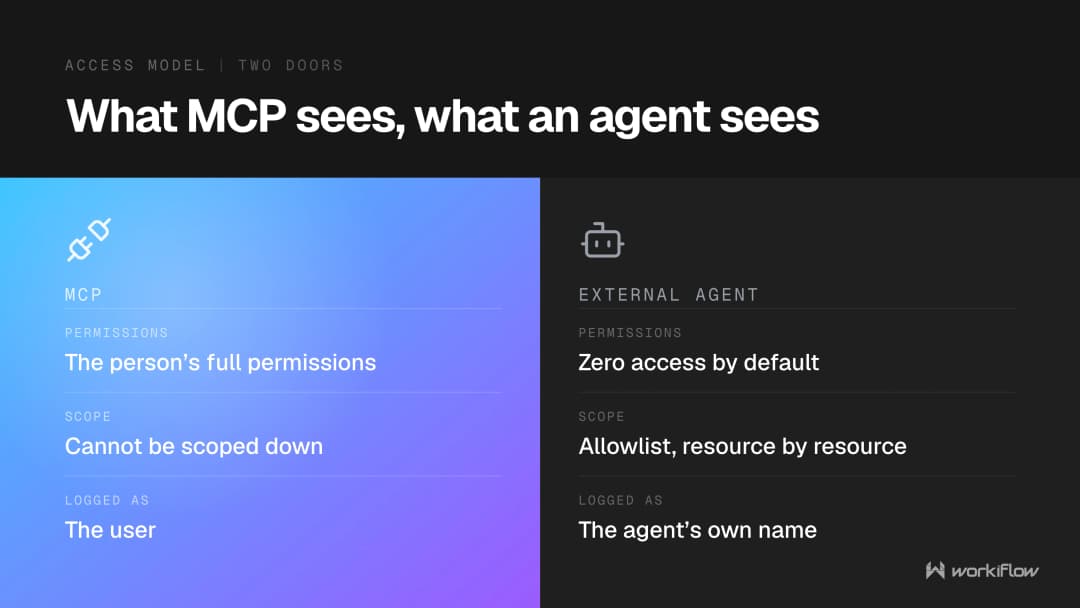
"MCP connects an external LLM to monday.com so it can read and act on your data. It is initiated by a person in a chat window and runs with that person's full permissions. Access cannot be scoped down below what the user already has access to. Actions are logged under the user who initiated them, not as a separate entity. It is best suited for technical users performing ad hoc queries."
And on monday AI agents, in the same comparison: "Permissions are admin-controlled and granular, you define exactly which boards the agent can access and what it can do within each. Every action the agent takes is logged in the activity log under the agent's own name."
If you have written an agent policy but left MCP alone, you have governed the narrower of the two things, because through MCP a person operates at their own full reach and there is no dial to give them less.
That is design rather than oversight, and monday is consistent about it: the same property that prevents scoping down prevents escalation. Its MCP FAQ answers "Does enabling MCP let AI agents see private boards?" with "Only if the person authorizing the connection has access to those boards. MCP never escalates existing permissions." Its developer documentation adds: "MCP operations execute on behalf of the authenticated user and respect that user's monday.com permissions (boards, workspaces, items). There is no elevated or shared service account that bypasses user-level access control." monday also describes what the server is, "a wrapper around the monday.com Platform API", and adds that "Authentication, authorization, rate limits, and data handling all follow the same security standards as the monday.com platform." It also states that "The MCP Server does not store or log customer OAuth tokens."
External agents work the opposite way, and monday labels the capability itself: "Attention: Bring Your Own Agent is currently in Beta." On access: "External agents follow an allowlist permission model. By default, a connected agent has no access to any content in your account, including public boards and monday docs. Access must be explicitly granted for each asset the agent needs." And: "Nothing is inherited from any user's permissions." Finally: "Every action an external agent takes is logged under the agent's own name in the activity log, so it is always clear what the agent did versus what a person did."
The controls that exist for MCP
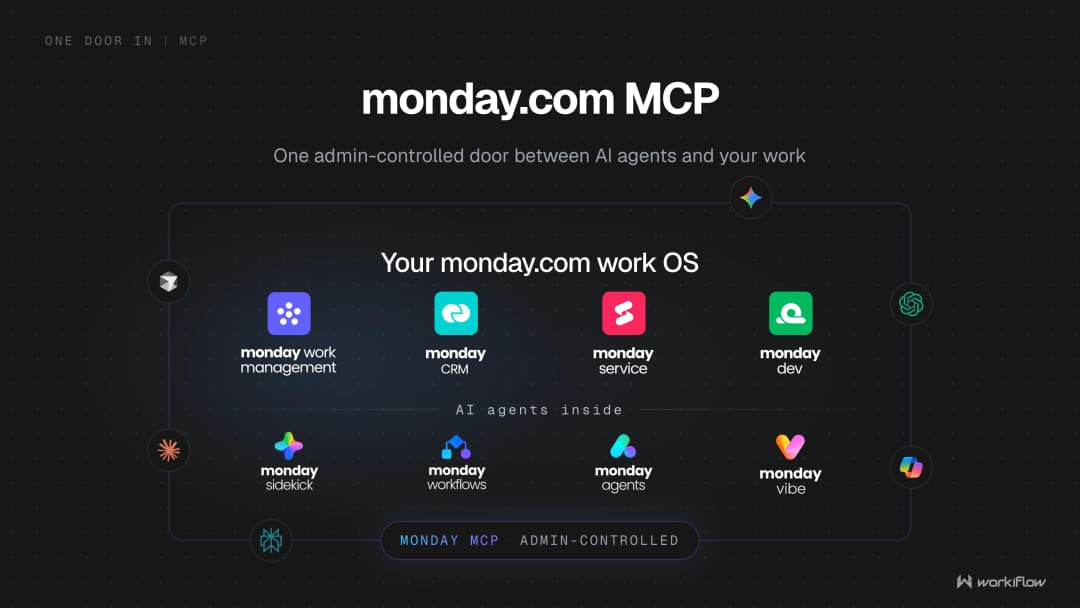
It is already there, monday is unambiguous: "MCP comes preinstalled with every monday.com account." Its FAQ answers the install question directly: "MCP comes preinstalled on every monday.com account. The marketplace listing exists for discoverability and documentation, but no installation step is required."
One switch closes the door. The master toggle is "Allow external AI agents to access your monday.com account data", and unchecking it "disables all sub-permissions at once. No external AI agent using a monday connector or hosted MCP will be able to access your account data, regardless of individual authorization." Only account admins can change these settings.
One sub-permission covers a long list. monday writes that "Public Hosted MCP controls access for every other AI agent and tool that connects via MCP, including Claude, ChatGPT, Cursor, Codex, Gemini CLI, GitHub Copilot, Glean, Lovable, n8n, Notion, Perplexity, Replit, TypingMind, Warp, Windsurf, and many more." That’s over fifteen named tools, and monday's "many more" is the honest part. If you are working out what is already connected, our post on finding shadow AI starts from that list.
Workspace scoping exists, and it lives somewhere else. By default, "when MCP is enabled it works across all workspaces in your account", the default option being "MCP is available across every current and future workspace". You can narrow it to "Specific Workspaces". But that control is not in the AI permissions tab: monday prints the path as open the Admin panel, go to Apps, find monday MCP in the list and open its Permissions. Two admin locations for one product.
Some things are explicitly yours. In monday's responsibility table, against "Prompt injection" it states that "The AI client or agent must implement guardrails and input validation." It also states that governance of third party or self-hosted MCP servers sits with the customer, and that the official endpoint is the one monday hosts. Three of its five customer responsibilities:
- "Secure OAuth tokens. Apply appropriate secret management and lifecycle controls (storage, rotation, revocation)."
- "Control access. Restrict which users and systems are permitted to connect to the MCP endpoint."
- "Monitor activity. Maintain logging and monitoring within the AI systems that interact with MCP."
What happens to your data, and who decided how long it is kept?
What monday says about monday AI
monday’s available models are published in a table of its foundational providers: Anthropic (Claude series, for example Sonnet and Haiku), OpenAI (GPT series), Google (Gemini service) and Sentence Transformers, with the deployment environment named for each. It calls this "a multi-provider strategy" and says every vendor goes through "a comprehensive vetting process, including by our security and legal teams". monday links its Sub Processor List as the current source.
Retention at the model layer. "monday.com's AI model providers operate under Zero Data Retention commitments. This means they do not store any customer data processed through monday AI. Additionally, monday.com's agreements explicitly prohibit the use of customer data for model training or any purpose other than processing the specific request." Where models are hosted on monday-controlled infrastructure, "the model providers do not have any access to customer data at all."
Training, and the part that qualifies it. "No, monday.com does not use your customer data or content to train its AI models, and we do not allow others to do so. While we may temporarily access your data (for up to 60 days) to monitor and improve our services, it is never shared with third parties or used for model training."
There is an opt-out. monday: "Yes, you can opt out by submitting a request via ai-support@monday.com or by contacting your account representative. If your email address is linked to multiple monday.com accounts, please specify in your request which account(s) you want to opt out. Please note that only Admins can submit and complete this request. It may take up to 5 business days to process your request."
Ownership, residency and custom models. "As between you and monday.com, you retain ownership of the content you provide, and the content generated by monday AI." On residency: "Yes. Data processed by monday AI will adhere to the same data region settings and policies as set in your account", and monday's checklist confirms customers can host data "in the EU, the US, or APAC regions". One current limit, stated by monday rather than inferred by us: "Currently, monday AI does not support bringing your own model or using custom API keys."
Permissions and encryption. "monday AI respects permissions set within your account. Users will be able to create, view, or generate content based on resources they have authorized access to", and data "is encrypted at rest using AES-256 and in transit with TLS 1.3".
What Anthropic says about commercial Claude
A warning first. Anthropic's Privacy Center publishes two collections, a commercial one covering the API, Console, Team and Enterprise plans, and a consumer one covering Claude Free, Pro and Max. Several articles exist in both versions at different URLs and say materially different things, each declaring its scope in its first sentence. Everything below is commercial. Applying a consumer answer to Claude for Work would misstate the facts.
On training: "By default, we will not use your inputs or outputs from our commercial products (e.g. Claude for Work, Anthropic API, Claude Gov, etc.) to train our models." The named exception is feedback: if somebody uses the thumbs up or down button, Anthropic may store the entire related conversation for up to 5 years, and a Team or Enterprise owner can switch that ability off with the Rate chats setting under Organization settings and Data and Privacy. There is a carve-out for connected tools: "Feedback data does not include raw content from connectors (e.g. Google Drive), including remote and local MCP servers, though data may be included if it's directly copied into your conversation with Claude."
On retention: for the Anthropic API, "we automatically delete inputs and outputs on our backend within 30 days of receipt or generation", with four named exceptions including a zero data retention agreement. For products that save conversations, Anthropic retains chats "to provide you with a consistent product experience".
And the sentence to sit with: "By default, data is retained indefinitely unless a custom retention period is set." Custom retention is an Enterprise feature set by a Primary Owner or Owner, minimum 30 days, with each month counted as 30 days so three months means 90. Two warnings come with it: "When you modify retention settings, any data that falls outside the new retention period will be deleted immediately upon saving", and "Data past its retention period will be permanently deleted and cannot be recovered." Anthropic does track the changes: "All retention-related actions and changes are automatically tracked in audit logs."
Our sibling post on whether Claude is safe for enterprise data, SOC 2, HIPAA and what a BAA covers goes through the assurance side, and the deployment post covers rollout.
One cost fact that is really a governance fact
monday has resources on a table of what an external agent consumes, with columns for the action type and what it consumes. One row covers "Agent reasoning and execution performed on the external platform (for example, chatting with the agent, or any analysis and decision-making it performs before taking action in monday.com)", and against that row monday puts third-party provider credits, for example Anthropic tokens, rather than monday AI credits. monday AI credits are consumed when the agent performs AI-specific actions inside monday.com. So the meter your monday admin sees in the Usage limits tab is not the whole bill.
How would you prove any of it six months later?
Start with what monday says on its own developer site: "Customer-facing logs. Self-service export of detailed MCP or API audit logs is not currently available. Organizations with specific compliance requirements should engage their monday.com representative to discuss current capabilities and roadmap considerations." Its risk table repeats it: "Internal monitoring is in place; customer self-service audit exports are not currently provided."
monday does maintain internal logging "for operational security, troubleshooting, and incident response". The gap is customer-facing export, monday states it openly, and it is a documented product limit. But if your compliance requirement is to hand an auditor a file of everything an AI client did through MCP last quarter, that is the sentence to plan around today.
The Audit Log is a security log, and it is Enterprise. Its eligibility block reads "Available on Enterprise plan". Scope: "The Audit Log gives the account admin a detailed report of all account security-related activity. Here, you can see when users have last logged in and out of the account, from which device, their IP address for the session, and more." It also captures "vulnerable events such as failed logins, the download of attachments, the export of board data, etc." Timestamps are always GMT, and monday states: "Currently, audit log records will not be deleted after a certain amount of time. This may change in the future, though." You can read what each event means before buying: monday's article links a public board titled "Audit Log events", introduced with "Check out the following board to learn more about each of the Audit Log events that we offer." The programmatic equivalent, the audit event catalogue object in the API, is marked "Only available for Enterprise plans", and no developer documentation page enumerates the events.
It has an API. monday's developer documentation states: "The audit logs in monday.com provide a detailed record of an account's security-related activities, including login attempts, board data exports, and more. Access to these logs is restricted to account admins on the Enterprise plan." The required permission is manage_account_security, and records carry timestamp, event, user agent, user and IP address. monday's secure configuration checklist describes the same API as allowing "for further integration into your overall security monitoring, including integrating with your internal SIEM".
The activity log is a different product with a different scope, and it is where AI shows up. "You can see AI-Powered actions that have been performed on the board, and by whom, by selecting the AI Powered tab from the top of your activity log. All AI actions will appear with the profile icon of the user who initiated the action, as well as an icon indicating it is AI-Powered."
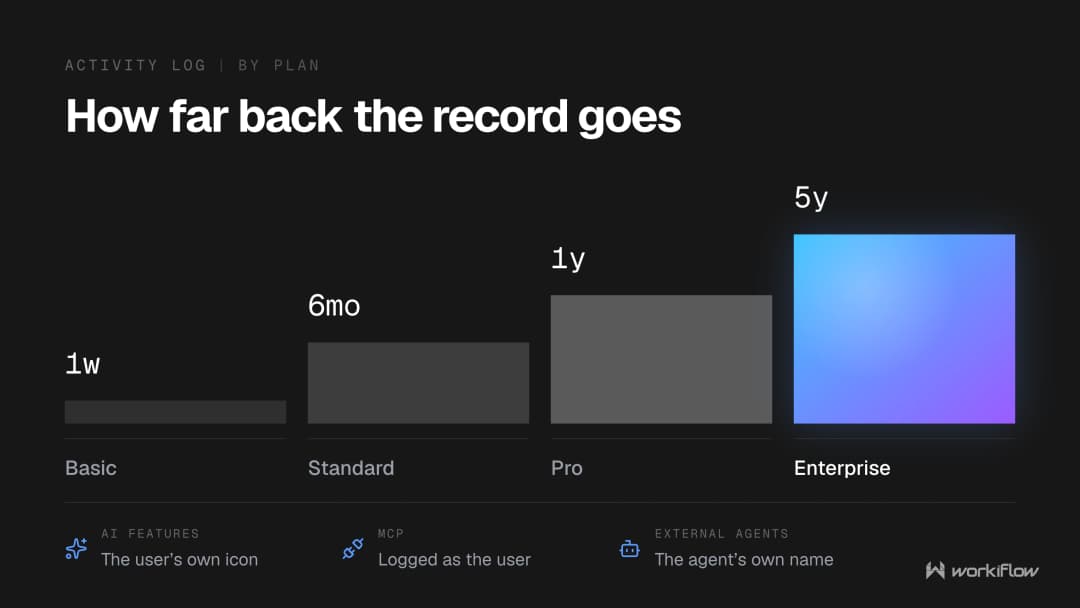
So the attribution model runs three ways: AI feature actions carry the initiating person's icon, MCP actions are "logged under the user who initiated them", and external agent actions log under the agent's own name. Three surfaces, two attribution models, and your evidence story needs to know which is which.
How far back you can look is a line item on your plan. "On the Basic plan, you are able to see the activity from the past week only." The Standard plan "holds activity data for 6 months". The Pro plan "holds data for up to 1 year". The Enterprise plan "holds data for up to 5 years". The Free plan is not listed.
Four more limits before you rely on it as evidence. The activity log "does not track any updates added to an item; it only tracks changes made to the item itself." Its export is narrower than the on-screen log, because on export only column value changes appear and item creation, deletion and movement do not. Filtering is plan-gated: monday states that the Filter Log option is only available on the Pro and Enterprise plans, and that the Basic and Standard plans can only filter by person to see who made the change. And "Items cannot be undone or restored directly from the activity log since it records what activity was done and by whom."
What is a governance programme made of?
The NIST AI Risk Management Framework's Govern function is the most usable public structure, and its six group statements read like a table of contents:
- Govern 1. "Policies, processes, procedures and practices across the organization related to the mapping, measuring and managing of AI risks are in place, transparent, and implemented effectively."
- Govern 2. "Accountability structures are in place so that the appropriate teams and individuals are empowered, responsible, and trained for mapping, measuring, and managing AI risks."
- Govern 3. "Workforce diversity, equity, inclusion, and accessibility processes are prioritized in the mapping, measuring, and managing of AI risks throughout the lifecycle."
- Govern 4. "Organizational teams are committed to a culture that considers and communicates AI risk."
- Govern 5. "Processes are in place for robust engagement with relevant AI actors."
- Govern 6. "Policies and procedures are in place to address AI risks and benefits arising from third-party software and data and other supply chain issues."
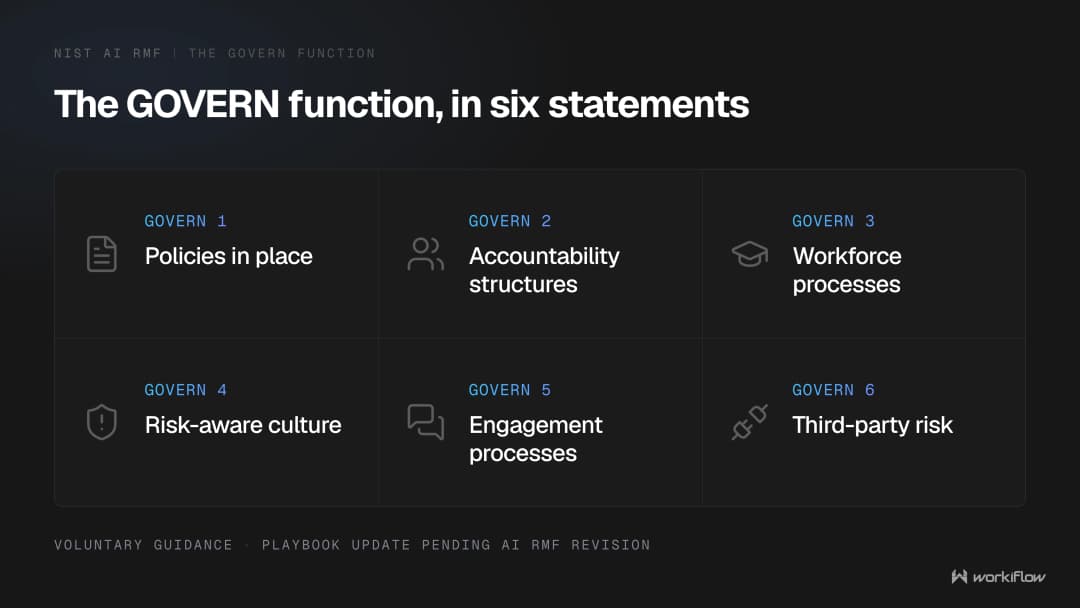
Underneath sit 19 subcategories, four of which map almost one to one onto controls above. GOVERN 1.6 asks that "Mechanisms are in place to inventory AI systems and are resourced according to organizational risk priorities", which is the Agent directory. GOVERN 1.5 asks for ongoing monitoring and periodic review, "including determining the frequency of periodic review." GOVERN 1.7 covers "Processes and procedures are in place for decommissioning and phasing out of AI systems safely ...", which is the deactivate action plus a rule about when to use it. GOVERN 6.1 covers third-party risk, which is your connector list and your vendor questionnaires. For accuracy: NIST states on the same page that "The AI RMF 1.0 is being updated. The Playbook will be updated after the AI RMF is revised."
monday publishes something closer to your Monday morning paper: a nine-part secure configuration checklist running from hosting and account setup, authentication and access controls, role-based permissions, logging and monitoring, data governance and backups, network and compliance controls, Guardian add-on protections and security feature governance, to its ninth and last section, "Configure AI permissions". AI is section 9 of 9, a fair reflection of where it sits inside a wider posture. The same checklist names five permission layers to work through, "Account permissions", "Custom account roles", "Workspace permissions", "Board permissions" and "Column permissions", against a principle stated as "Access should be based on role, need-to-know, and least privilege principles". It also notes that HIPAA-compliant plans exist with a Business Associate Agreement available.
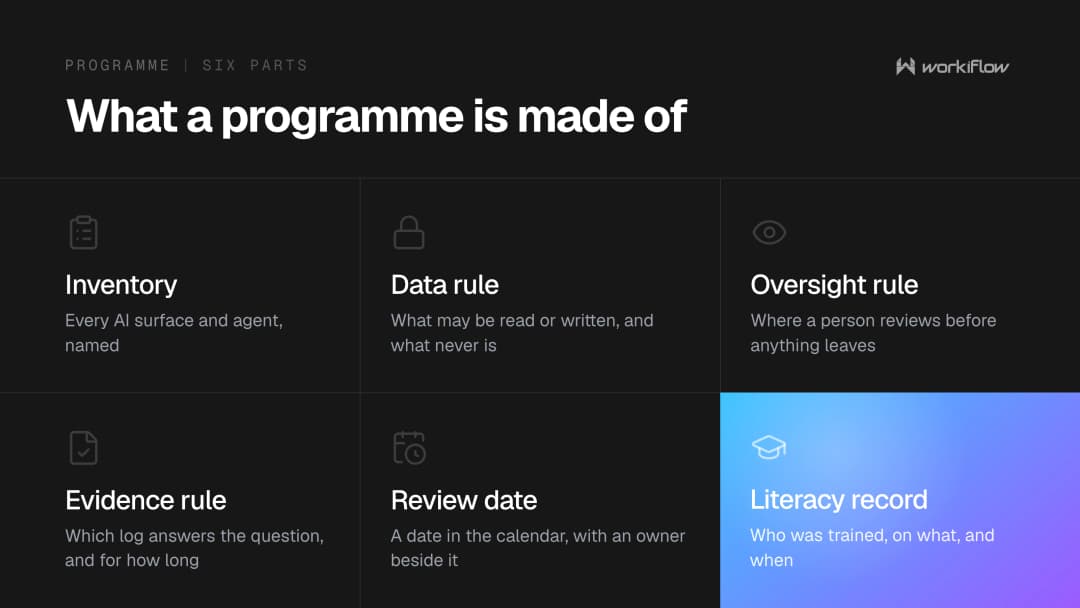
A workable programme is roughly six things:
- 1.An inventory. Every agent, MCP connection and AI feature in use, with an owner, starting from the Agent directory and the AI Connectors list.
- 2.A data rule. Which workspaces AI may touch, implemented with workspace permissions rather than described in a policy nobody reads.
- 3.An oversight rule. Which workflows run unattended and which pause for a person. monday shipped a human-in-the-loop approval block for AI Workflows on 3 August 2026, announced as "Add a human-in-the-loop block in AI Workflows to send approval requests and branch based on the response." As of today monday's help centre returns no results for the quoted phrases "human approval" or "human-in-the-loop", so the changelog is currently the surface that names it. Our post on that block, and the decision-layer post on when an AI workflow should require human approval to go deeper.
- 4.An evidence rule. What you log, on which plan, how long it is kept and what you can export, written down before somebody asks.
- 5.A review date, with a named person and permission to switch things off. This is where governance programmes quietly fail, for the same reason implementations do: what decides whether either one sticks is adoption rather than go-live, which is the argument our post on monday implementation lessons makes at length.
- 6.A literacy record. Who was trained, on what, when. Proportionate, and dated.
What can you honestly say about certification, yours and everyone else's?
Three organisations, three different sets, and blurring them is the fastest way to lose a security review.
monday states on its own support site that it holds "certifications such as ISO/IEC 27001, SOC 2 Type II, and ISO/IEC 27701", and that it "regularly reviews and expands its compliance portfolio to address new industry and regulatory requirements, including those related to AI governance." Note what is not on that list: ISO/IEC 42001, the AI management standard. The forward-looking phrase is language about intent, not a certification.
Anthropic publishes four compliance credentials for its commercial products: "HIPAA-ready configuration (BAA available)", "ISO 27001:2022 (Information Security Management)", "ISO/IEC 42001:2023 (AI Management Systems)" and "SOC 2 Type I & Type II". So Anthropic does hold the AI management standard.
Workiflow, applies the same standard to itself that it applies to vendors. Our Trust Center states: "SOC 2 Type II certified · ISO 27001 in progress." Our SOC 2 Type II examination covers the Security trust services criterion for the period April 20 to July 20, 2026, and received an unqualified opinion from Prescient Assurance. ISO 27001 is not complete and we will not describe it as anything else. What is true now is our published control register: 69 continuously monitored controls across 10 domains, listed by domain with a count against each, from Organizational Management at 17 to Vulnerability Management at 3. We carry Errors and Omissions Insurance and Comprehensive Cyber Liability cover. We are a Platinum monday.com partner holding Advanced Delivery Partner, CRM Specialization and Work Management Expert badges, we run a team of 50+ specialists, and Workiflow is a Select partner in the Claude Partner Network Services Track.
When do you not need us for this?
Often. If you are a small team on a Standard plan using AI columns to summarise updates, with no regulated data and no external agents connected, you need one afternoon rather than a programme: switch AI off in the workspace holding your HR files, decide who may connect an outside tool, write half a page, and put a review in the calendar.
An outside pair of hands earns its keep in narrower cases: when your plan does not show the controls you expected, when MCP is already in use and nobody knows by whom, when your evidence requirement outruns what the activity log retains, or when a regulated workload or a customer's security questionnaire turns a sensible internal decision into something that has to be documented and repeatable.
Frequently asked questions
Does the EU AI Act require a human to approve every AI decision in our work platform?
No. The AI Act's human oversight rules are in Article 14, which binds high-risk AI systems only, and Article 14 sits in a part of the Act whose application is deferred to 2 December 2027 for Annex III systems and 2 August 2028 for Annex I systems. Ordinary business automation in a work platform is out of scope on both counts. The Act itself has been in force since 1 August 2024 and has applied generally since 2 August 2026.
What does actually bind an ordinary business today?
Three things are worth knowing. The AI literacy duty in Article 4 has applied since 2 February 2025 and binds providers and deployers, which includes companies that simply use AI. The AI Act's transparency rules in Article 50 started to apply on 2 August 2026, with a 2 December 2026 deadline for providers who placed synthetic content systems on the market before 2 August 2026. And GDPR Article 22 has applied since 25 May 2018.
Is GDPR Article 22 a requirement to approve automated decisions before they run?
No, and this is the most common mistake on the topic. Article 22 gives a person the right to obtain human intervention, to express their point of view and to contest a decision. Those are remedies after a decision has been made, not a checkpoint before it. It applies to decisions based solely on automated processing that produce legal effects or similarly significantly affect the person.
Can we stop an AI agent immediately by changing a permission?
Not reliably. monday states that if you already have AI blocks or agents running, changing permissions will not stop or break them. A credit limit is not an instant stop either, because monday says some capabilities continue running for a short period after the limit is reached. To stop an agent now, deactivate it in the Agent directory, and monday states that admins can deactivate any external agent at any time.
Can we limit what monday MCP can reach?
Partly. You can turn it off entirely, restrict which roles may use it, and scope it to specific workspaces through Admin panel then Apps then monday MCP then Permissions. What you cannot do is give a person less through MCP than they already have, because monday states that MCP runs with the initiating person's full permissions and access cannot be scoped down below that. External agents work the opposite way, with an allowlist and no access by default.
Do we need to install monday MCP from the marketplace?
No. monday states that MCP comes preinstalled on every monday.com account, and that the marketplace listing exists for discoverability and documentation with no installation step required. That is why it is worth checking your connector settings even if nobody has asked for it.
Can we export an audit trail of what AI did?
Only in part today. monday states that self-service export of detailed MCP or API audit logs is not currently available, and suggests that organisations with specific compliance requirements speak to their monday representative. The Enterprise Audit Log covers account security events and has an API. AI actions appear in the board activity log under an AI Powered tab, and how far back you can look depends on your plan, from the past week only on Basic up to 5 years on Enterprise.
Does monday or Anthropic train AI models on our data?
Both say no for the products in question. monday states that it does not use customer data or content to train its AI models and does not allow others to do so, while noting it may temporarily access data for up to 60 days to monitor and improve services, with an admin-only email opt-out that takes up to 5 business days. Anthropic states that by default it will not use inputs or outputs from its commercial products to train its models, with a named exception for feedback you explicitly submit.
Who decided how long our AI conversations are kept?
Usually nobody, which is the point. Anthropic states that by default data is retained indefinitely unless a custom retention period is set, and that custom retention is an Enterprise feature configured by a Primary Owner or Owner, with a minimum of 30 days. On the monday side, activity history retention is set by your plan rather than by a setting. Making both an explicit, named decision is one of the quickest governance wins available.