On this page
- Why does this post not lead with a total?
- How do monday.com's automation limits change what you can build?
- Which platform limits shape how you design boards and dashboards?
- What does a migration usually break on?
- Who can see what, and why decide that on day one?
- What does it look like when the work lands?
- Why will we not quote an ROI percentage?
- When do you not need a partner for this?
- Frequently asked questions
If you already run your work on monday.com, you have probably built something you are proud of. A board that maps how your team actually thinks. Automations that quietly remove a job nobody enjoyed.
The interesting part is rarely the first build. It is what happens in month three, when the board has grown, the automations fire more often than anyone predicted, and two people have joined who were not in the room when the structure was decided.
So this post skips the inspirational version. Here is what monday.com documents, what two clients published, and what we will not claim.
Why does this post not lead with a total?
You may have seen implementation counts on our own site. The homepage FAQ describes Workiflow as "a Platinum Partner with 1,000+ implementations". The partnerships page says "Hundreds of shipped projects across the partner stack", which the page scopes to several categories together, including implementations, integrations and automations, rather than to monday.com work alone. Those are our own statements about ourselves, and we are reporting them as that rather than as a verified figure.
Here is the honest reason. None of those pages defines what counts as one implementation, none states a counting method, and none carries an as-of date for the number. So we are not hanging a headline on a total you cannot check.
What you can check is smaller and more useful. Workiflow is a monday.com Platinum partner, described on our partnerships page as one of a small group worldwide, holding three badges: Advanced Delivery Partner, CRM Specialization and Work Management Expert. The team is more than 50 specialists, fully remote. Five case studies published, covering four clients. Two of those clients, Global Mobility Partners and Florman Tannen, have published figures, and everything below comes either from monday's own documentation or from them.
How do monday.com's automation limits change what you can build?
Start with the sentence that decides whether any of this applies to you. monday documents that "Automations and integrations are only available on the Standard plan and up." On Free or Basic, the automation conversation is a plan conversation first.
Above that, every plan carries a monthly action allowance. monday's pricing article for automations and integrations prints all three on one page: 250 actions for automations and 250 for integrations each month on Standard, 25,000 of each on Pro, and 250,000 of each on Enterprise. The same page adds its own warning, that 250 actions a month "is typically exhausted within days for accounts that notify multiple people or map multiple columns per automation."
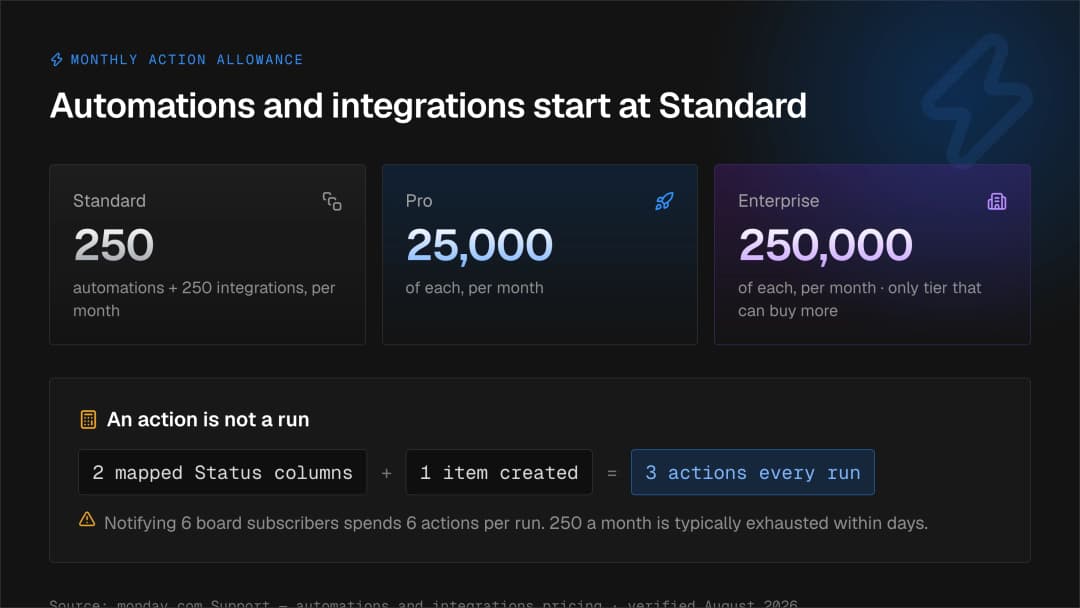
monday explains the arithmetic behind it. An action is not a run. If an automation notifies board subscribers, monday's actions and limits article states that "if you have 6 board subscribers, 6 actions will be used each time this automation runs." Item creation with mapped columns works the same way: each mapped Status, Tag, People or Dropdown column, and the update section, counts as one action, plus one for creating the item. monday's own example maps two Status columns and creates an item, which spends three actions every time it runs.
Two more details change how you plan. When you hit the full quota, monday gives a 72 hour grace period before automation runs pause, and going over carries into the next month, so monday says "it's possible to begin a month with 0 actions available". Only Enterprise customers can buy extra actions.
There is a second, separate limit and it is easy to miss. monday states plainly in its automations and integrations pricing article: "Two separate limits apply to automations: the monthly action limit (how many times your automations run) and the active workflow limit (how many Workflow Builder recipes can be active at once). Reaching one does not affect the other." The active workflow caps differ by product. For the monday AI work platform, monday documents up to 3 active workflows on Standard, 20 on Pro and 250 on Enterprise. For CRM, monday service and monday dev, it documents up to 5 on Pro and 250 on Enterprise. Worth knowing before you plan around the Standard number: the same article opens with a banner reading "Available on Pro and Enterprise plans", which does not agree with the Standard limit in its own body, so confirm what your account actually offers before designing to three.
monday also names a failure mode common in busy accounts. It defines competing automations as ones "that have the same trigger (or also one automation with multiple actions) where the actions run at the same time and will conflict with each other." Its advice is to consolidate them into one automation and to put final stage actions last, meaning moving, archiving or deleting an item.
Which platform limits shape how you design boards and dashboards?
monday limits boards to 10,000 items on every plan type except Enterprise, which allows 100,000. monday CRM is carved out separately: the same article notes CRM Pro accounts can have up to 5 boards of 100,000 items each. Dashboards connect 1 board on Free, 5 on Standard, 20 on Pro and 50 on Enterprise, hold up to 30 widgets, not counting text widgets, and carry "a maximum of 20,000 total items, subitems, and linked items across all boards connected to a dashboard." And the API allows 1,000 calls a day on Free, Standard and Basic, 10,000 on Pro and 25,000 on Enterprise, with a note that the Pro and Enterprise figures are recommended usage rather than hard caps.
Put those together and a few architecture choices stop being matters of taste. If your integration platform, your reporting tool and an AI assistant all talk to monday, they share one daily call budget: monday's developer documentation states that calls through the hosted Platform MCP server "also count toward this daily limit, since each MCP tool call is executed as a GraphQL API request."
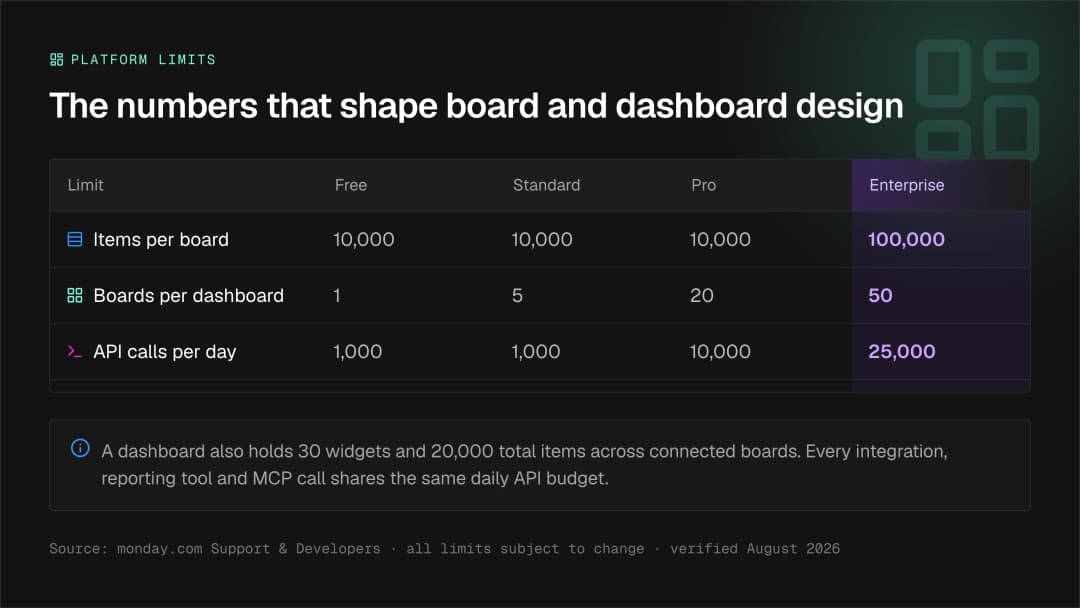
None of this is a complaint about monday. Limits are what make a platform predictable. monday also notes that "All limits and exceptions are subject to change", so check the numbers on the day you design.
What does a migration usually break on?
Rarely the big things. monday's Excel import article documents the specifics: an import accepts up to 100 columns and 8000 rows, and when you import to a new board "only the first 50 columns will be imported." Dates must be in ISO format. Only the first tab of a workbook imports. Subitems arrive as items and have to be converted by hand. A column with more than 40 unique labels fails, and monday calls that "a hard limit". A protected spreadsheet will not upload at all, and hidden formatting can cause a silent failure with no error message.
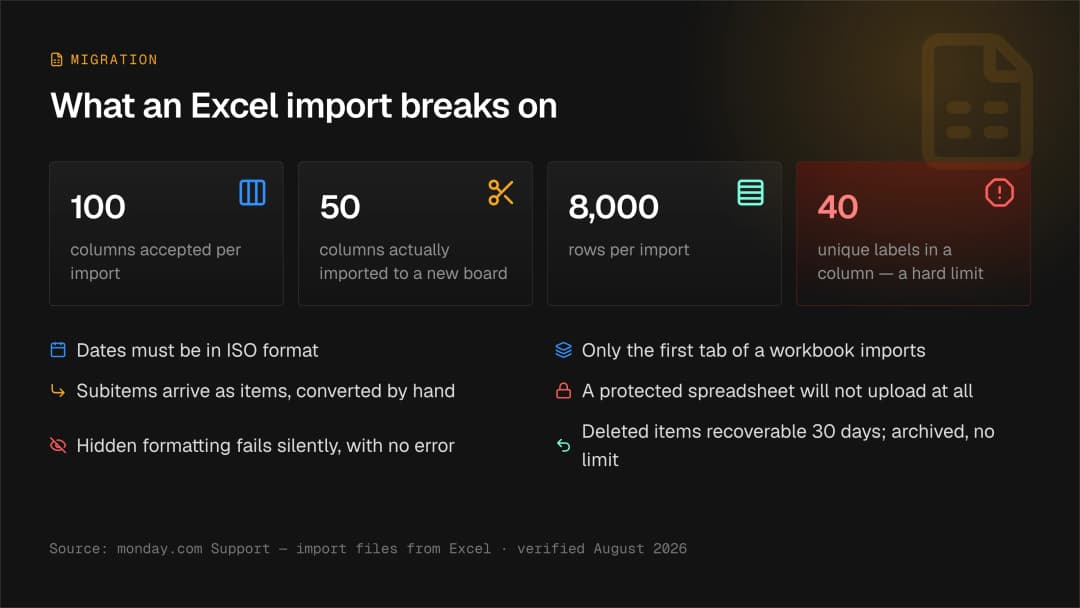
Clean the data before you open the importer, decide which fields are status columns and which are plain text, and test one small slice first. Deleted items stay recoverable for up to 30 days and archived items can be restored with no time limit.
Who can see what, and why decide that on day one?
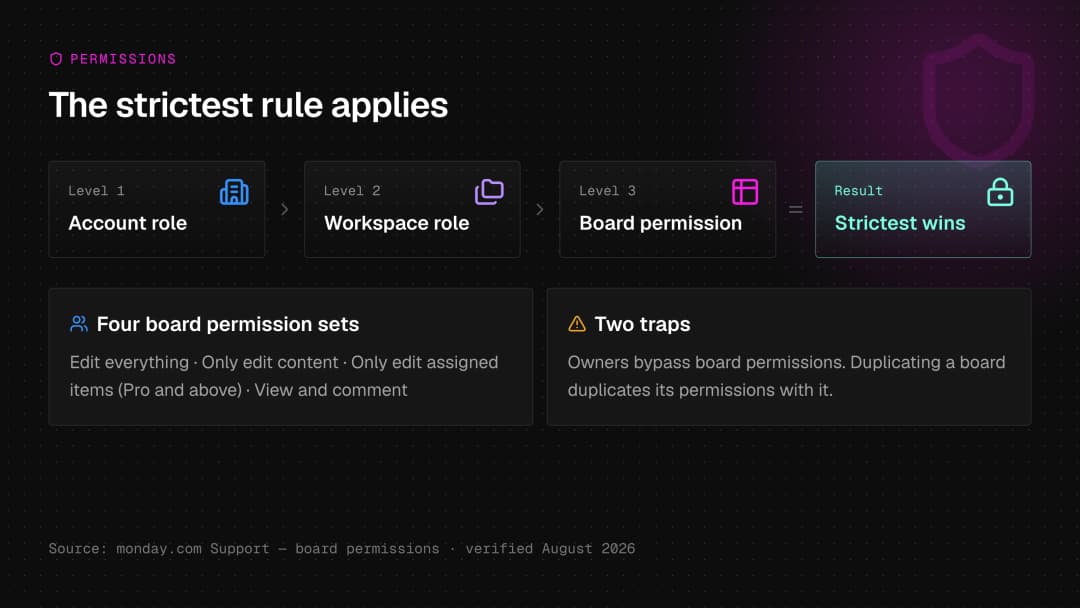
monday publishes four board permission sets: edit everything, only edit content, only edit assigned items, which is available on the Pro plan and above, and view and comment. Two sentences matter most. monday states that "Owners bypass board permissions." And where account role, workspace role and board permissions disagree, monday states that "The strictest rule applies."
Someone holds the right board permission and still cannot do the thing, because a stricter setting one level up is winning. There is a migration trap here too: monday documents that when you duplicate a board, its permissions are duplicated with it, so a quick copy can quietly hand out access you did not intend.
What does it look like when the work lands?
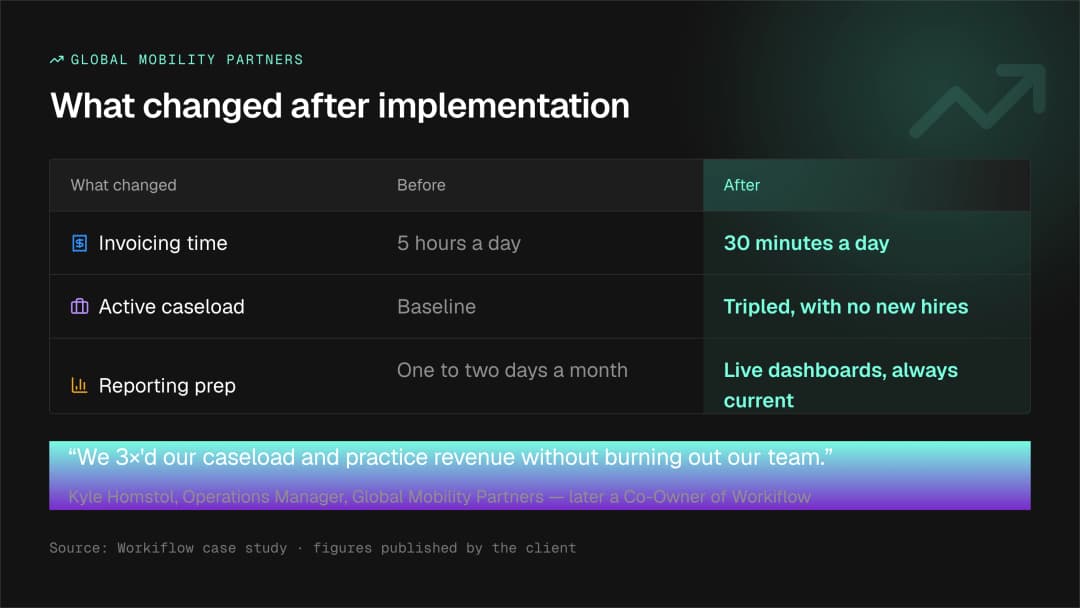
Global Mobility Partners published a before and after table in our case study:
| What changed | Before | After |
|---|---|---|
| Invoicing time | 5 hours a day | 30 minutes a day |
| Active caseload | Baseline | Tripled, with no new hires |
| Reporting prep | One to two days a month | Live dashboards, always current |
Kyle Homstol, Operations Manager at Global Mobility Partners, is quoted in that article: "We 3×'d our caseload and practice revenue without burning out our team. That's when I realized this wasn't just a solution, it was a business model." One disclosure: the same article notes that Kyle later became a Co-Owner of Workiflow, so read the quote knowing it. An earlier December 2025 case study for the same client prints the same invoicing, reporting and caseload figures.
Florman Tannen is a 20 year healthcare consulting firm that ran client work on Trello for years. The published problem was structural: no reporting, no way to manage 70 to 80 entities per client, and no visibility for leadership. Today a single monday.com instance runs 40 to 50 different client companies, each with its own structure, all built on the same underlying framework.
Marc Florman, Managing Partner, said three things worth repeating. "We knew from our research that monday.com can do it. But we didn't know how to actually implement it without Workiflow." Then: "Switching to monday.com has literally saved one of my team members hours every week. That's real money." And the line that sums up the point of an implementation: "The system isn't so much a time saver as a competency."
Two other published clients, Service Express and Olivia Clarke Homes, have real stories and no hard figures, and we say so on our own site rather than estimating: "Service Express hasn't published hard hour or dollar figures for this engagement, so we're not manufacturing them here." That rule applies to this post too.
Why will we not quote an ROI percentage?
Because we cannot check one. monday commissioned a Total Economic Impact study from Forrester Consulting and says so on its own report page: "We commissioned Forrester Consulting to help us find out." That page prints none of the study's figures. So there is no defensible percentage to give you here, and the table above is a smaller claim you can check.
When do you not need a partner for this?
Often. If you are a small team on Standard, your process fits a handful of boards, and nobody is asking for cross-board reporting yet, monday.com is built for you to do this yourself.
The point at which a partner starts to pay for itself is usually structural rather than technical. Several departments with different definitions of the same record. Reporting that has to be right for a board meeting. Our own implementation practice runs as Discover, Build and Adopt, under a line we believe: go live is a milestone, adoption is the goal.
Frequently asked questions
Which monday.com plans include automations and integrations?
monday documents that automations and integrations are available on the Standard plan and up. On Free and Basic they are not available, so the first question in any automation project is which plan the account is on.
How many automation actions does each monday.com plan include?
monday's pricing article for automations and integrations lists 250 actions for automations and 250 for integrations each month on Standard, 25,000 of each on Pro, and 250,000 of each on Enterprise. The cycle refreshes monthly.
Why do automations use actions faster than expected?
Because an action is not the same as a run. monday documents that each notified subscriber counts as one action, and each mapped Status, Tag, People or Dropdown column counts as one, plus one for creating an item. One recipe can spend several actions every time it fires.
How many items can a monday.com board hold?
monday limits boards to 10,000 items on every plan type except Enterprise, which allows 100,000 items. monday CRM is carved out separately: CRM Pro accounts can have up to 5 boards of 100,000 items each. Deleted items are recoverable for up to 30 days, and archived items can be restored with no time limit.
What usually goes wrong in an Excel import into monday.com?
The details rather than the volume. An import accepts up to 100 columns and 8000 rows, but only the first 50 columns are imported when you create a new board. Dates need ISO format, only the first tab of a workbook imports, subitems arrive as items, and a column with more than 40 unique labels fails outright.
Do I need an implementation partner for monday.com?
Not always. A small team with a few boards and no cross-department reporting can build a very good system alone. A partner earns its place when several departments share records, when data has to move out of an older tool, or when reporting has to be right the first time.