On this page
- Do you need a consultant?
- What does discovery look like, and what do you get for it?
- What gets built, and what's excluded from the price?
- Who owns what gets built?
- Who do you talk to, and does that person stick around?
- What happens after the build goes live?
- Where the job title comes from
- Frequently asked questions
You're already paying for monday.com. Half the team still lives in Excel. The boards exist, but nobody trusts them, so status still happens elsewhere, like Slack.
A monday.com consultant sits down with you in the mess of half trusted boards, parallel spreadsheets, and status updates that still happen in Slack, maps how the work actually moves, builds the boards and automations to match, trains the people who will run it, and is still reachable when the process changes next quarter.
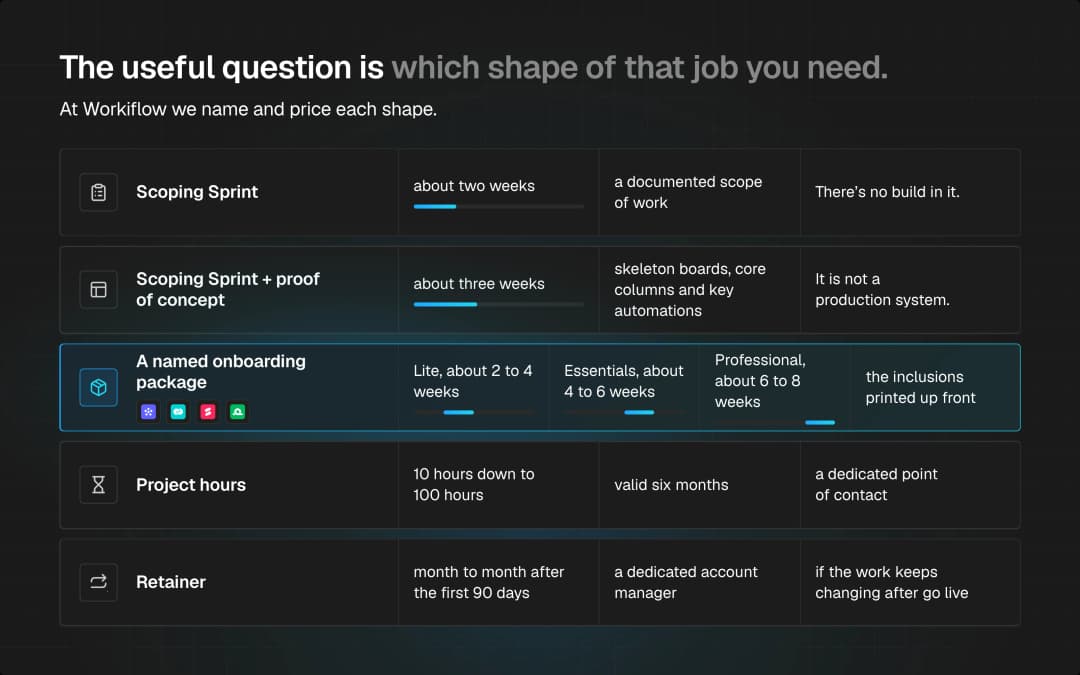
That's the job. The useful question is which shape of that job you actually need because you might not need all of it.
At Workiflow we name and price each shape, so you're not buying a vague "consultant" and finding out later what that meant.
Do you need a consultant?
Not always.
If one team already knows the process and you just need monday Work Management stood up, skip the big discovery. Go straight to a named onboarding package.
If you have one decision, which product, whether to migrate, whether this board design will survive next quarter, that's a paid hour, not a project.
If several teams, several tools, and nobody can draw the process on a whiteboard, that's when scoping earns its keep. Paying for a two week map that tells you not to build yet is cheaper than paying for a build nobody uses.
We'll tell you which of those you are.
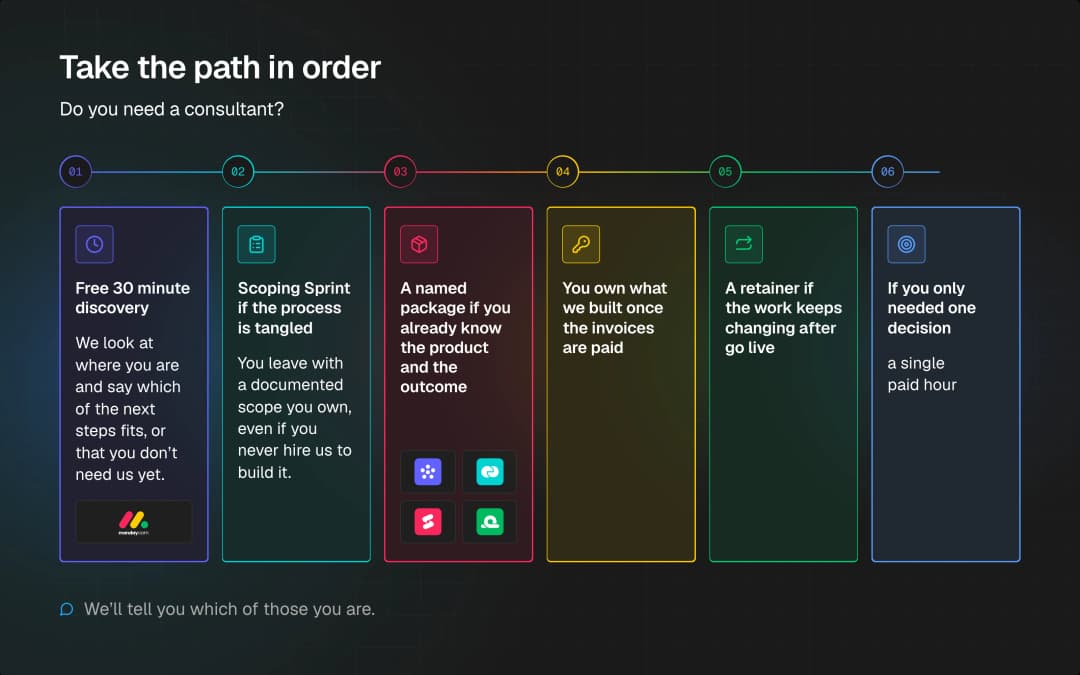
The path, in order:
- 1.Free 30 minute discovery. We look at where you are and say which of the next steps fits, or that you don't need us yet.
- 2.Scoping Sprint if the process is tangled. You leave with a documented scope you own, even if you never hire us to build it.
- 3.A named package if you already know the product and the outcome.
- 4.You own what we built once the invoices are paid.
- 5.A retainer if the work keeps changing after go live.
- 6.$275/hour if you only needed one decision.
What does discovery look like, and what do you get for it?
At Workiflow, discovery is a priced, time boxed product, not a sales call stretched into a week.
The Scoping Sprint is a flat $2,500 over about two weeks. We run a short series of discovery sessions (up to three), map the workflow, and hand you a documented scope of work with components and effort estimates, plus a recommended path and a review session. You own that document whether or not you ever build with us. The fee isn't credited against a later build.
It covers one account and one process area. There's no build in it. If you already know what you want built, don't buy this.
If you want to see the shape of the workflow in your own account before you commit to a full build, Scoping Sprint + proof of concept is $5,000 over about three weeks. That adds a board structure diagram and skeleton boards, core columns and key automations that show the end to end flow. You keep it. It is illustrative. It is not a production system. The fee still stands alone.
monday.com sells this kind of pre build thinking too, not only through partners. Under "Project based training and consulting" they offer to:
Validate your idea with our experts and build a solution design together.
and to
Expedite your idea POC by creating custom scripts or AI-driven app prototypes built by our experts.
Scoping isn't unique to working with a partner. What differs on our side is what's on the page before you buy: a fixed price, a printed duration, and a listed scope.
What gets built, and what's excluded from the price?
The monday Work Management Onboarding package is the clean example of a build with the inclusions printed up front.
- Lite, $2,500, about 2 to 4 weeks
- Essentials, $5,000, about 4 to 6 weeks
- Professional, $10,000, about 6 to 8 weeks
The printed inclusions are boards, views, automations, forms, dashboards, and training. Professional adds portfolio and workload views, roughly 25 automations, UAT, a phased rollout, and full documentation.
What's out of every tier: monday.com license costs, data migration, and a second product. If you need Work Management and CRM, that's two packages.
Data migration is its own product: Essentials $3,500 (one source to one target, up to roughly 10,000 records per object) or Professional $8,000 (attachments, history, heavier mapping). It's a one time move, not an ongoing sync. Source data quality shows up in the result.
monday.com's own implementation packages draw a similar line. Custom data migrations, custom integrations, and application development sit outside the priced package. monday sells those as tailored services through your account team; they just don't print a price on the page. We do.
Who owns what gets built?
Once you've paid, you own what we built for you.
Workiflow's Terms of Service put it in one sentence:
Upon full payment of all applicable fees, Client will own all Deliverables specifically created for Client, except for any Workiflow Tools incorporated therein.
The carve out is our reusable tooling, the templates and libraries we bring to every job. You get a license to use those as part of the deliverable.
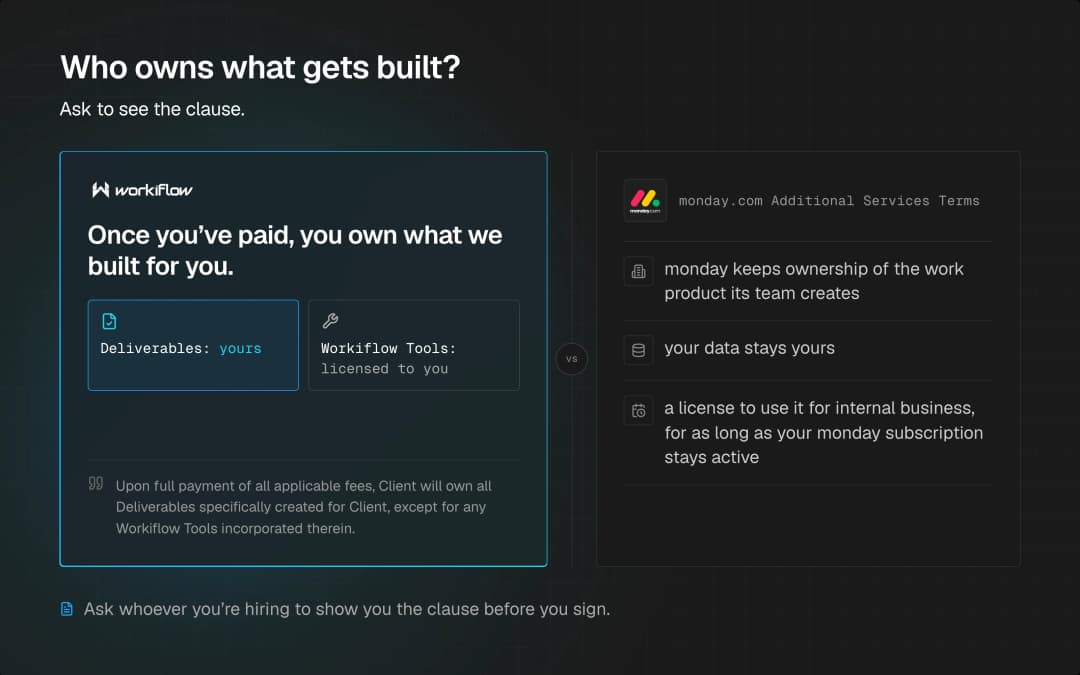
monday.com's Additional Services Terms work differently. monday keeps ownership of the work product its team creates (your data stays yours). After you pay, you get a license to use it for internal business, for as long as your monday subscription stays active.
If that distinction matters to you, and for a lot of teams it does, ask whoever you're hiring to show you the clause before you sign.
Who do you talk to, and does that person stick around?
You get a named person. On a retainer, that's a dedicated account manager. On project hours it's a dedicated point of contact. Same idea: one person coordinates, and they pull in whoever the work needs.
monday.com names a Managed Services Consultant too. Their terms say they'll use reasonable efforts to keep the same person, and they may substitute. That's an effort, not a guarantee.
There's also a job on your side. monday's Managed Services terms ask you to name a Customer Program Manager. That person is an Admin. They approve tasks before the work starts, and they schedule the quarterly meeting.
What we need on your side is separate. Someone who can answer "is this how the work actually moves?"
What happens after the build goes live?
The onboarding packages include a revision round, and builds with an AI piece get a 14 day tuning window after launch. Training and documentation come with the build, so the system shouldn't depend on us staying in the room.
If the process is going to keep changing, new team, new product, a report the CEO wants every Monday, that's a retainer, not another project. Ours is month to month after the first 90 days. monday.com's own services page points the same direction: implementation, then managed services if you want the account to keep evolving. The Managed Tech Stack Glossary is a plain English read on what a managed partner does differently from a one time build.
If you don't need a team on call, buy project hours instead. Blocks run from 10 hours at $275/hr down to 100 hours at $225/hr, valid six months, with a dedicated point of contact.
Where the job title comes from
It's not a title one agency invented. monday.com uses it in its own contracts: the Professional Service Package terms call the people doing the work "consultants," and the Managed Services Terms name a Managed Services Consultant on every managed account.
monday.com and the partners around it use the word the same way, an outside specialist who plans, builds, and supports a monday.com setup on your behalf. What changes is the engagement around that person: a two week scope, a fixed price build, a bag of hours, or someone who stays after launch.
Frequently asked questions
What's the difference between the free discovery call and a paid consultation?
The free 30 minute discovery call is to pick a path. A paid consultation is $275/hour with a senior specialist, billed in one hour increments, no minimum. You get a written summary after. Use discovery when you don't know what to buy. Book a consultation when you already know the decision and want a specialist on it.
How much does it cost to hire a monday.com consultant?
There isn't one number, because "consultant" covers a two week scope and a multi month build. At Workiflow:
| Package | Price | Timeline | Best for |
|---|---|---|---|
| Scoping Sprint | $2,500 | about 2 weeks | A tangled process across teams. No build. You keep the scope. |
| Scoping Sprint + POC | $5,000 | about 3 weeks | The same, plus skeleton boards in your own account. |
| Work Management Onboarding, Lite | $2,500 | 2 to 4 weeks | One team that already knows its process. |
| Work Management Onboarding, Essentials | $5,000 | 4 to 6 weeks | The middle tier: more build, still one product. |
| Work Management Onboarding, Professional | $10,000 | 6 to 8 weeks | Portfolio and workload views, roughly 25 automations, UAT, phased rollout, full documentation. |
| Data migration, Essentials | $3,500 | n/a | One source to one target, up to roughly 10,000 records per object. |
| Data migration, Professional | $8,000 | n/a | Attachments, history, heavier mapping. |
| Consultations | $275/hour, no minimum | n/a | One decision, billed in one hour increments. |
| Project hours | $275/hr at 10 hours down to $225/hr at 100 hours | 6 month validity | Small ongoing work without a retainer. |
The discovery call is how we stop you buying the wrong one.
Who owns the system once it's built?
With Workiflow, you own the deliverables once fees are paid, aside from our reusable tools. With monday.com professional services, monday keeps the work product and licenses it to you while your subscription is active. Ask to see the clause.
Can a consultant migrate our data from another platform into monday.com?
Yes. Our Data Migration package is $3,500 or $8,000 depending on volume, attachments, and history. It's a one time migration, capped at roughly 10,000 records per object. monday.com implementation packages exclude custom migration from the printed price; they sell it separately as tailored services.
Do I need a consultant if my monday.com setup is fairly simple?
Probably not a scoping engagement. A single, well defined product build can go straight into a fixed price onboarding package. If you're not sure, take the free 30 minutes and let us tell you.
If you're already paying for monday and the team's still in the spreadsheet, start with the free 30 minute call. We'll tell you whether you need a scope, a package, an hour, or nothing from us yet.