On this page
- Watch the video
- ARTEX finds boring mistakes at machine speed
- PolinRider hides malware in files developers never open
- Our audit flagged something most people miss
- Why we still build on Next.js, Supabase and Vercel
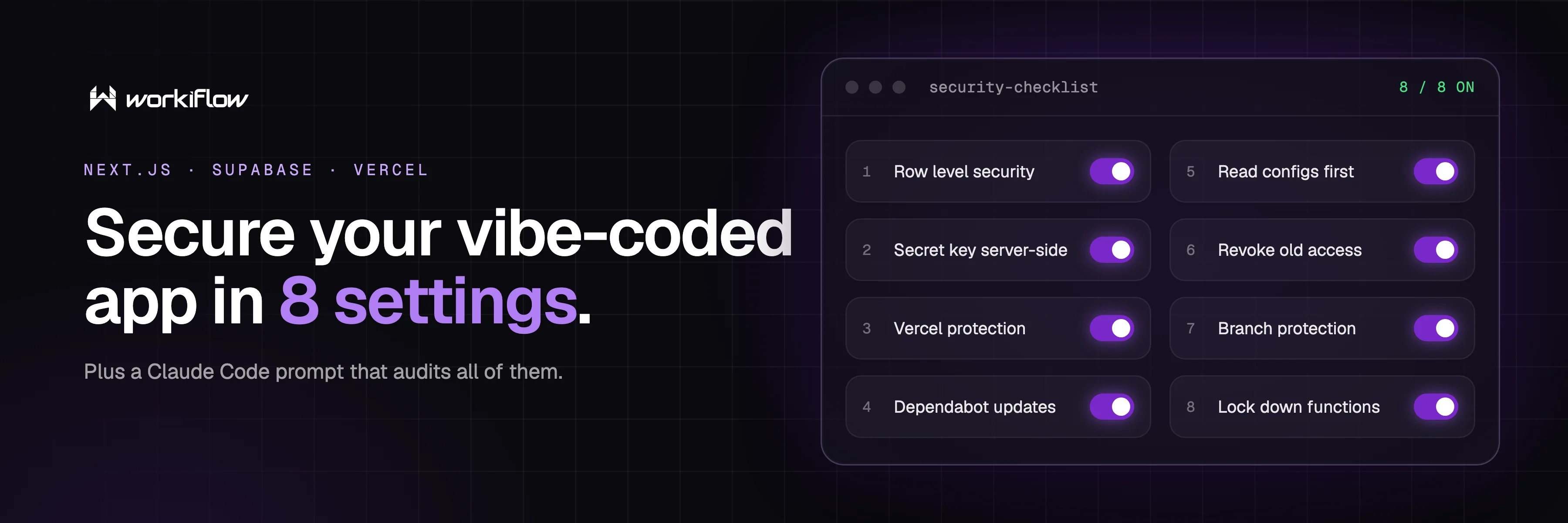
- Turn on these eight settings
- Turn on row level security for every table
- Keep your secret key out of the browser
- Lock down your Vercel project
- Keep your dependencies updated
- Read the config files before you run a repo you didn't write
- Revoke old access
- Protect your main branch
- Check your database functions as well as your tables
- Run the full audit with Claude Code
- What real audits keep finding
- Frequently asked questions
In mid-November 2026, the FBI warned that attackers using ARTEX, an AI hacking tool, were getting from first contact to inside a network in under three hours. Over the same months, a North Korea-linked group that researchers call PolinRider has been planting malware in hundreds of GitHub repos, and its favorite hiding place is the Tailwind config that sits in almost every Next.js project.
We build on Next.js, Supabase and Vercel, so we went back through our own projects. Below are the eight settings that close the gaps, and the audit prompt we use, which you can paste into Claude Code and run on your own app today.
The full walkthrough, with a live demo on a test app built for the video. All of its data is fake.
ARTEX finds boring mistakes at machine speed
ARTEX started as an open-source penetration testing tool, the kind a company runs against its own systems to find holes first. It came out in July. You connect it to an AI model and it scans, finds a weakness, gets in and moves around on its own. Criminals now use it for real attacks. The original repo came down in October, and copies are everywhere, along with what appears to be a paid "PRO" version.
The breaches linked to it are ordinary. A group of South Korean banks lost data on tens of thousands of people, in large part because multi-factor login was off. Barracuda, a security company, was hit through an old password belonging to a vendor it had stopped working with. Nobody had revoked it.
A machine that never gets tired finds that kind of mistake fast. Vibe-coded apps are full of them.
PolinRider hides malware in files developers never open
PolinRider goes after developers. Researchers believe it began with a fake VS Code extension. Once installed, the malware uses the GitHub account the developer is already signed in to, so it never needs a password, and pushes code to their repos as them.
That code lands in config files that run at build time, like tailwind.config.js. The group is mostly after crypto wallets, saved browser passwords and cloud keys.
Now picture a normal build. You clone a starter template, tell your agent to set it up, and it runs npm install and the dev server. At no point does anyone open the config files. PolinRider is built for exactly that habit.
Our audit flagged something most people miss
Before recording the video, we ran Supabase's Security Advisor across all thirteen of our projects. On the table side it came back clean, with zero tables open to the public.
It did flag database functions. In one project, a few background-job functions could be called by anyone holding the app's public key. That catches even teams who have row level security on every table, and it is step 8 below.
Why we still build on Next.js, Supabase and Vercel
In February, The Register reported an app built on Lovable that exposed around 18,000 users. Another app, Moltbook, reportedly had no row level security at all and left about 1.5 million API tokens readable. Both came down to settings nobody turned on.
On a rented server you run Express and Postgres yourself, and every open port and forgotten admin panel is something ARTEX can scan. Vercel leaves you no server to forget about. When React2Shell (CVE-2025-55182), a maximum-severity React bug, landed in December 2025, Vercel pushed firewall rules to every customer. Teams on their own servers had to patch alone.
Next.js keeps secrets on the server. Mark a file server-only, and if anything tries to pull it into the browser, the build fails. Our test app tried to leak its secret key, and Vercel refused to ship it, which matters when an AI writes half your code. Supabase adds login with multi-factor built in, plus row level security, where the database checks every row on every request.
None of it is bulletproof. Vercel was breached in April through an AI tool one of its employees used. Next.js had React2Shell. Row level security does nothing until you turn it on. What the stack does is shrink your job from securing a whole server to about eight settings.
Turn on these eight settings
01Turn on row level security for every table
If you do one thing from this list, do this. Open Security Advisor in Supabase. Any table marked "RLS disabled" is open to anyone with your public key, and that key ships in your app's front end. In the video, one pasted link with that key returned every client and every private note in the test app, with no login.
The fix turns row level security on and adds one rule: users see only their own rows. After it ran, the same link returned "permission denied", and logged-in users still saw their own data.
alter table public.clients enable row level security;

create policy "Users can read their own rows"
on public.clients for select
to authenticated
using ((select auth.uid()) = user_id);
Building with AI? Tell it: "Enable row level security on every table, so users can only see rows where the user ID matches their own."
02Keep your secret key out of the browser
The Supabase secret key (service_role on older projects) skips every row level security rule you have. Keep it in Vercel's environment variables and read it only in server code. Never give a secret a NEXT_PUBLIC_ name, because that prefix sends the value straight to the browser.
03Lock down your Vercel project
Mark every secret as sensitive. It is the default for new variables now, so check your older projects; sensitive variables are what protected customers in the April breach. Turn on Deployment Protection so preview links stay private, and set up the Vercel Firewall. Then put two-factor login on Vercel, Supabase and GitHub today.
04Keep your dependencies updated
Turn on Dependabot so GitHub tells you when a package is out of date or vulnerable, and run npm audit before you ship. Vercel patches its own servers. Your package.json is yours to patch.
05Read the config files before you run a repo you didn't write
This is the PolinRider defense. Open tailwind.config, next.config and package.json first. Look for one huge line that runs off the screen, or a big block of random letters. If you see either, don't run it. Check for a .vscode/tasks.json file too, and for anything called postinstall.
06Revoke old access
Barracuda was breached through a password nobody revoked. Delete old API keys, remove people who have left the team, and check which AI tools can reach your Google and GitHub accounts. An AI tool with that kind of access is how attackers got into Vercel.
07Protect your main branch
Turn on branch protection in GitHub. Block force pushes, which PolinRider uses to rewrite your history, and require a review before anything merges into main.
08Check your database functions as well as your tables
AI tools love creating database functions. A function marked SECURITY DEFINER runs with its owner's full rights, so it skips row level security completely, and by default anyone with your public key can call it. In the test app, with row level security on and the table locked, a link that called a function still returned every client.
In Security Advisor this shows up as "Public Can Execute SECURITY DEFINER Function". If you see it and didn't mean it, revoke it. It takes one line of SQL per function.
revoke execute on function public.your_function_name()
from public, anon, authenticated;
Pro tip
If logged-in users do need the function, grant execute back to authenticated only, and check auth.uid() inside the function before it reads or changes any data.
Run the full audit with Claude Code
Nobody remembers eight settings. The prompt below checks all of them, plus what we look for when we review production apps: login and permission traps, unprotected API routes and server actions, leaked keys, supply-chain tricks, and your live GitHub and Vercel settings. Open Claude Code in your project's root folder and paste it in. It reads and reports, and it changes nothing until you approve a fix.
Sign in to the GitHub, Vercel and Supabase command-line tools first (gh auth login; vercel login and vercel link; supabase login and supabase link). The checks still run without them, but you get a checklist where you could have had answers. On the test app it found every hole, with no false alarms, in about four minutes. A real project takes five to fifteen.
Audit this project for security issues. It's a Next.js + Supabase + Vercel app. Work like a careful security reviewer: assume nothing is safe until you've read the code or setting that makes it safe. Skip any section that doesn't apply to this app.

RULES
- Read-only. Don't edit files, run migrations, deploy, or change any setting on GitHub, Vercel or Supabase until I approve a fix. Don't send requests to my live app.
- Never print or read secret values. Don't open .env files at all, because that puts the values in this chat. Get variable names from `process.env.` usages in the code (and the Vercel env list in section 11). When you find a key anywhere, report only its type (for example "Supabase secret key") and file:line, never any characters of it. If you can't tell whether a key is real or a placeholder without looking at it, grade it INFO and ask me to confirm it's fake.
- Keep account IDs, project refs and usernames out of your output where you can (put them in shell variables). I may be sharing my screen.
- Skip node_modules and build folders (.next, dist) unless a check below says otherwise.
- Grades: FAIL (exploitable now), WARN (risky, or only on another branch), INFO (looks bad but is clearly deliberate or a placeholder), PASS, N/A (the app doesn't have this), or CAN'T CHECK (say what would let you check it). For each non-PASS item give file:line or the setting name, and one sentence on what an attacker could actually do. Collapse PASS and N/A into one line per section.
- Don't flag something as FAIL from a pattern match alone. Trace the code path and confirm it's reachable. For database access, prove it with a read-only transaction that changes nothing, for example: `begin read only; set local role anon; select count(*) from public.<table>; rollback;`
- supabase/config.toml only describes local development. Never grade production auth settings from it.
- Don't stop to wait for me partway through. If you need something from me, ask, carry on with the other checks, and re-grade when I reply.
- Finish with a fix list, most urgent first. For each fix give the exact code, SQL or setting to change, and say if a database fix belongs in a new migration so it stays fixed. Wait for my OK before applying anything.

1. DATABASE ACCESS (row level security)
- Check the live database, not just the migrations. Use the first of these that works:
  a) the Supabase MCP server, but only if its project matches this repo's (compare with supabase/.temp/project-ref). Run its security advisors too.
  b) the Supabase CLI, if this folder is linked: read-only queries with `supabase db query --linked "<sql>"`.
  c) Otherwise, give me SQL to paste into the Supabase SQL Editor, and grade from my results.
- List every table and view in the public schema (and any other schema exposed to the API). FAIL any table with RLS off.
- For every table, list which roles (anon, authenticated) have SELECT, INSERT, UPDATE and DELETE grants. With RLS off, the grant is the rule: anyone with that role can do it to every row.
- Read every policy, not just whether one exists. FAIL `using (true)` for anon on private data, and policies that only check "is logged in" when each row belongs to one user or team. Logged-in users seeing other people's data is the most common real bug.
- Check INSERT and UPDATE policies separately, including `with check`, so users can't create or move rows into someone else's account.
- FAIL views that skip RLS (views run as their owner unless created with `security_invoker = true`).
- Check Storage buckets: which are public, and whether the storage policies limit who can read and upload.

2. DATABASE FUNCTIONS
- Find every SECURITY DEFINER function, in migrations and in the live database, and whether anon and authenticated can execute it.
- FAIL any that anon or authenticated can execute and that read or change data without checking auth.uid() or a role. They skip RLS completely, and Postgres lets everyone execute new functions by default. Prove it with the read-only `set local role` method.
- WARN on SECURITY DEFINER functions with no search_path set. If it's set to something other than `''`, that's a low WARN (`set search_path = ''` with fully qualified table names is safest).
- WARN on functions, policies or tables in the live database that no migration creates. Someone changed production by hand.
- List Supabase Edge Functions. FAIL any that do real work without checking who's calling (a user session, or a secret for machine callers).

3. LOGIN AND PERMISSIONS (the traps AI-written code falls into most)
- FAIL any RLS policy, function or server code that decides access from `user_metadata` (also `raw_user_meta_data`, or `auth.jwt() -> 'user_metadata'`). Users can change their own metadata with `supabase.auth.updateUser()`. Roles belong in `app_metadata` or a table users can't write to.
- Find every column that controls access or money: role, is_admin, plan, credits, balance, team_id, org_id, approved, verified. FAIL if a user can change their own, for example a `profiles` update policy of `using (auth.uid() = id)` with table-wide UPDATE granted. RLS can't limit columns, so it needs column-level grants, a trigger, or a `with check` that stops the value changing.
- FAIL server code (route handlers, server actions, server components, middleware/proxy) that makes access decisions from `supabase.auth.getSession()`. On the server it trusts the cookie without verifying it. Use `getUser()` or `getClaims()`.
- WARN if pages or routes are protected only by middleware/proxy and don't check again where the data is loaded. Some older Next.js versions let attackers skip middleware entirely (CVE-2025-29927, fixed in 15.2.3 and matching 14.x/13.x/12.x patches).
- Login links: FAIL if `redirectTo` or `emailRedirectTo` is built from request headers (Host, X-Forwarded-Host) or user input. Remind me in section 12 to check the Supabase redirect URL allow-list.
- Realtime and GraphQL: if the app uses Supabase Realtime, check that tables streamed with postgres_changes have RLS, and that private or broadcast channels have policies on realtime.messages. If pg_graphql is enabled, it exposes the same tables through another API: same grants and RLS rules apply.

4. API ROUTES AND SERVER ACTIONS
Find every API route, route handler, server action, edge function and cron endpoint. For each one, report who can call it and what it checks:
- FAIL any that read private data, change data, or cost money without checking the user's session on the server.
- FAIL any that check "logged in" but not "allowed": the user must own the record or have the right role. Look hard at anything that takes an ID from the request.
- Server actions are public endpoints. They need the same checks as API routes.
- Anything using the Supabase secret/service_role key skips RLS, so the route itself must do the access check.
- Webhooks (Stripe and others): FAIL any that don't verify the provider's signature. For payments, FAIL if the code trusts an amount or price sent from the browser instead of the provider's record.
- Cron routes: FAIL if they don't check a secret like CRON_SECRET.
- Redirects: FAIL any `?next=`, `?redirect=` or `?returnTo=` that can send a user to another site (check `//evil.com` and `/.//evil.com` against the code).
- Server-side fetches: WARN any code that fetches a URL the user supplies (link previews, "import from URL", image proxies, user-configured webhooks) without blocking private and internal addresses. FAIL if it sends your own keys or cookies with that request.
- Errors: WARN any route that returns raw error objects, stack traces or database error messages to the browser.

5. SECRET KEYS
- Search every branch and all git history for committed secrets. If gitleaks or trufflehog is installed, use it with output that redacts values. Otherwise list only the commits and files where a key-like string appears, without printing it: `git log --all -G'sb_secret_|service_role|sk_live_|rk_live_|BEGIN [A-Z ]*PRIVATE KEY|eyJ[A-Za-z0-9_-]{20,}\.eyJ' --format='%h %s' --name-only`. Then judge each hit by the variable name and file, not the value. Placeholders like "your-key-here" are INFO.
- FAIL any NEXT_PUBLIC_ variable that holds a secret (it ships to the browser). Judge by the name and how the code uses it.
- FAIL any file using a secret or service_role key that can be imported into a "use client" component or other browser code, on any branch. Check each such file starts with `import "server-only"`.
- Check .env files are in .gitignore and never appear in git history.
- FAIL if `productionBrowserSourceMaps` is on in next.config.
- If a .next folder exists, search .next/static for real key values only, with patterns like `sb_secret_[A-Za-z0-9_-]{20,}` and JWTs whose payload says service_role.
- Remind me that any key ever pasted into an AI chat, committed, or shown on screen should be rotated.

6. UNTRUSTED CONTENT (XSS)
Supabase's default auth cookies can be read by JavaScript, so in this stack an XSS bug usually means account takeover.
- Every `dangerouslySetInnerHTML`, `innerHTML` and HTML/markdown renderer: find where the content comes from. FAIL user-written or AI-generated content that isn't sanitized (for example with DOMPurify) right before rendering.
- User uploads: WARN if uploaded files are served from your own domain with the uploader's file type, or shown in an iframe without `sandbox`. An "image" that's really HTML can then run script as your site.
- AI with tools: if an AI model in the app can take actions (write to the database, send email, fetch URLs, call APIs) and also reads content other people wrote (emails, documents, web pages, other users' messages), WARN. That content can give the model instructions (prompt injection). Check its tools can only do what the current user could do, and risky actions need the user to confirm.
- Security headers: look in next.config, middleware.ts or proxy.ts (Next 16 renamed it), and vercel.json. Report whether there's a Content-Security-Policy with a script-src (enforced or only report-only), X-Content-Type-Options: nosniff, and frame-ancestors or X-Frame-Options.

7. ABUSE AND COST
- Find anything that calls an AI model, sends email or SMS, or does other paid work. FAIL if a logged-out visitor can trigger it, and WARN if a logged-in user can trigger it with no limit. These get abused as free chatbots, spam relays and bill runners.
- Check the code for rate limiting on sign-in, sign-up, password reset and those paid endpoints. If there's none in code, say Vercel Firewall rules are the place to add it (section 11).
- WARN if sign-in and password reset have no CAPTCHA.

8. DEPENDENCIES
- Run `npm audit` (or the equivalent for this project's package manager) and summarise high and critical issues. Treat it as the source of truth for anything newer than you know about.
- Report the installed Next.js and React versions and whether they're patched for React2Shell (CVE-2025-55182) and anything newer npm audit reports.
- Suggest a release-age cooldown, so versions aren't installed the day they're published (pnpm has `minimumReleaseAge`). Check the installed package manager's version supports one before suggesting it, and don't invent flags. If it doesn't, say so and mention the alternatives.

9. SUPPLY CHAIN (PolinRider-style attacks)
- Scan config files (tailwind.config.*, next.config.*, postcss.config.*, eslint configs, vite/webpack configs) for very long lines, lines padded with whitespace to hide code off-screen, base64 blobs, eval, new Function, child_process, or network requests.
- Check every package.json for preinstall, install, postinstall or prepare scripts, and tell me exactly what each runs. Check the lockfile for dependencies with install scripts.
- Check every .vscode/tasks.json for tasks with "runOn": "folderOpen".
- Flag any font or image file (.woff, .woff2, .ttf, .otf, .png, .jpg, .gif, .ico), including in node_modules, that is actually JavaScript or text. Find them by extension, then run `file` on just those.
- Check docker-compose files and Dockerfiles for images from unknown publishers.
- Check .github/workflows for third-party actions pinned to a branch instead of a version or commit, and for `pull_request_target`.
- List commit author and committer names (not emails) with commit counts, so I can spot one I don't recognise. Check for history rewrites with `git reflog --all | grep -E ': (reset|rebase|commit \(amend\))'` and report any you find.

10. GITHUB SETTINGS (check live with the gh CLI)
If `gh auth status` works, get the repo with `gh repo view --json nameWithOwner` and check these read-only. If gh isn't installed or logged in, mark this section CAN'T CHECK and tell me to run `gh auth login`.
- Visibility: `gh api repos/OWNER/REPO --jq .visibility`. If it's public, raise the severity of anything secret found in history.
- Dependabot alerts: `gh api repos/OWNER/REPO/vulnerability-alerts --silent && echo on || echo off`. FAIL if off. (Off can also mean I'm not a repo admin; say so if I might not be.)
- Dependabot security updates: `gh api repos/OWNER/REPO/automated-security-fixes`. WARN if off.
- Open alerts (skip if alerts are off): `gh api "repos/OWNER/REPO/dependabot/alerts?state=open"`. List critical and high ones with their age. A 403 saying alerts are disabled means off. Ignore any hint about needing a new token scope.
- Fix PRs nobody merged: `gh pr list --author app/dependabot --state open`. WARN on any older than two weeks.
- Version updates: check .github/dependabot.yml exists and covers each package folder. WARN if missing.
- Branch protection on the default branch: `gh api repos/OWNER/REPO/branches/BRANCH/protection` and `gh api repos/OWNER/REPO/rules/branches/BRANCH`. FAIL if the first says "Branch not protected" and the second returns `[]`. Otherwise check that force pushes and deletion are blocked and a pull request is required.
- Secret scanning and push protection: `gh api repos/OWNER/REPO --jq .security_and_analysis`, and `gh api "repos/OWNER/REPO/secret-scanning/alerts?state=open"`. WARN if off. Empty/null means it isn't available on this plan (private repos need GitHub's paid Secret Protection); grade WARN and say why. A 404 saying "disabled" means off, not "no alerts". FAIL on any open alert.
- Actions token: `gh api repos/OWNER/REPO/actions/permissions/workflow`. WARN if default_workflow_permissions is "write".
- Access: list collaborators and deploy keys (`gh api repos/OWNER/REPO/collaborators --jq '.[].login'`, `gh api repos/OWNER/REPO/keys`) so I can remove anyone who shouldn't be there.
- If an endpoint fails for lack of permission, say which one and move on.

11. VERCEL SETTINGS (check live with the Vercel CLI)
If `vercel whoami` works and the folder is linked (.vercel/project.json exists), check these read-only. If it fails because a VERCEL_TOKEN environment variable is rejected, run `env -u VERCEL_TOKEN vercel whoami`. If that works, prefix every vercel command in this section with `env -u VERCEL_TOKEN` so it uses my normal login. Otherwise mark this section CAN'T CHECK and tell me to run `vercel login` and `vercel link`. Read projectId and orgId from .vercel/project.json into shell variables, ID and ORG.
Every `vercel api` response can contain environment variable values. ALWAYS pipe it through jq (or `node -e` if jq isn't installed) to keep only the fields named below. Never print a raw response, and never add `decrypt=true`.
- Firewall: `vercel firewall overview`. WARN if it says "Not configured" or has no custom rules: that means no rate limits on sign-in, API routes or paid endpoints. Report whether Attack Mode is on.
- Bot protection: `vercel api "/v1/security/firewall/config/active?projectId=$ID&teamId=$ORG" | jq '.managedRules'`. Report whether the managed bot protection rules are on. "Config not found (404)" means the firewall was never set up, so they're off. If you recommend turning bot protection on, warn me to add a bypass rule for my own crons, webhooks and other non-browser callers first, or they'll get blocked.
- Deployment Protection: `vercel api "/v9/projects/$ID?teamId=$ORG" | jq '{ssoProtection, passwordProtection}'`. WARN if both are null: preview URLs are probably public, and previews often use real data. Ask me to confirm in Project Settings → Deployment Protection, since other plan features can also protect them.
- Environment variables: `vercel api "/v10/projects/$ID/env?teamId=$ORG" | jq '.envs[] | {key, type, target}'`. WARN on secrets (keys, tokens, passwords) that aren't type "sensitive". FAIL any secret with a NEXT_PUBLIC_ name. WARN on variables the code needs that are missing from production.
- Don't run any vercel command that changes something (publish, rules add, env add or rm, deploy).

12. THINGS ONLY I CAN CHECK
Give me a short checklist for what you couldn't check above, putting first whatever your findings make urgent. Leave out anything that doesn't apply:
- Supabase: Security Advisor shows no errors. Authentication → URL Configuration: Site URL is your real domain, and redirect URLs have no broad wildcards (like `https://*.vercel.app/**`, which lets anyone's Vercel app receive your users' login links). Sign-ups off if the app is invite-only. Email confirmation on. Leaked-password protection on. CAPTCHA on. MFA available, and required for admin accounts.
- Vercel: preview deployments don't point at the production database.
- Accounts: 2FA on Vercel, Supabase, GitHub, your domain registrar and your email. Remove old team members, unused API keys, and old OAuth apps and GitHub Apps (github.com/settings/applications), especially AI tools you no longer use.
What the prompt can miss
It reads your code and settings and never sends traffic to your app, so it can miss bugs that only show up while the app runs, and flaws in your own business rules, like a discount that applies twice. Two runs may find different things. Fix what it finds, run it again before every launch, and get a human review before you handle money or sensitive data at scale.
What real audits keep finding
Tables with row level security switched off are the rare case. These come up again and again in real Next.js and Supabase apps:
- Logged-in users can see each other's data. Row level security is on, but the policy checks "is logged in" where it should check "owns this row".
- A database function skips row level security. It's marked SECURITY DEFINER and anyone with the public key can call it.
- Users can make themselves admin. The role lives in user_metadata, or in a profiles column the user's own update policy lets them change.
- The server trusts getSession(). It reads the login cookie without checking it. Server code should use getUser() or getClaims().
- A server action or API route has no auth check. Server actions are public endpoints, and they're easy to forget.
- A route uses the service-role key and trusts the request. That key skips row level security, so the route is the only lock.
- AI or email endpoints get abused. With no login or limit, they become a free chatbot or spam relay on your bill.
- Unsanitized HTML or markdown. In this stack, one XSS bug usually means account takeover.
- Removed users keep access. They stay signed in until their login token expires.
- Dependabot is off. Or its fix pull requests sit unmerged for weeks.
- Main has no branch protection. Anyone, or anything, with push access can force-push over it.
- The Vercel Firewall was never set up. So there are no rate limits and no bot protection.
- Preview deployments are public. And they're connected to the real database.
Frequently asked questions
Is vibe coding secure?
It can be. AI tools build what you ask for and leave security settings at their defaults, and several defaults in Supabase and Vercel leave data open. An app built with AI on Next.js, Supabase and Vercel is in good shape once row level security is on for every table, the secret key stays on the server and the other six settings in this article are switched on.
Is it safe to expose the Supabase anon or publishable key?
Yes, when row level security is on. That key is built to ship in your front end, so assume anyone can read it. It protects your data only when every table has row level security with policies, and when the public cannot execute SECURITY DEFINER functions. The secret key (service_role on older projects) is the one that must never reach the browser.
How do I check if my Supabase tables are exposed?
Open Security Advisor in your Supabase dashboard. It lists every table with row level security disabled and every SECURITY DEFINER function the public can execute. The Claude Code prompt in this article checks both, along with your policies, API routes, server actions, and GitHub and Vercel settings.
What does SECURITY DEFINER mean in Supabase?
A SECURITY DEFINER function runs with the rights of the role that created it, which in Supabase usually bypasses row level security. If the anon or authenticated role can execute it, anyone with your public key can call it through the API and read or change whatever the function touches. Revoke execute from public, anon and authenticated, or switch the function to SECURITY INVOKER.
What is ARTEX?
ARTEX is an open-source AI penetration testing tool. Connected to an AI model, it scans for weaknesses, breaks in and moves through a network on its own. In November 2026 the FBI warned that criminals were using it to get inside networks in under three hours.
What is PolinRider?
PolinRider is the name researchers gave a North Korea-linked campaign that plants malware in GitHub repositories, often inside build-time config files like tailwind.config.js. It pushes code through developers' own signed-in GitHub accounts and steals crypto wallets, saved browser passwords and cloud keys. Read the config files of any repo before you run it.
Run the prompt on your app this week. If you know someone shipping without row level security, send them this post.